Showing posts with label unlock. Show all posts

Wednesday, January 3, 2018

How to Unlock Samsung C520

How to Unlock Samsung C520


Unlock Phone Steps:

- Run Samsung 2G Tool.
- Click Direct Unlock.
- Phone Must Be ON.
- Connect Cable D800 To Your Phone.


visit link download
Read more »

How to Unlock Bootloader of Xiaomi Devices

How to Unlock Bootloader of Xiaomi Devices


All Recently launched Xiaomi devices comes with locked Bootloader. Locked Bootloader means you can�t flash the custom recovery, custom kernel or custom ROM on your device unless you unlock the Bootloader of your device. You need to Download Mi Flash Unlock Tool to Unlock Bootloader Of Xiaomi Devices. Follow the steps below to Use Mi Flash Unlock Tool to Unlock Bootloader Of Xiaomi Devices.


Mi Flash Unlock Tool is a one click utility program which easily unlock your device bootloader. The tool is completely free and very easy to use.

Note:-
  • Unlocking your Bootloader will void your phone warranty, and you won�t claim it back.
  • This method is only Xiaomi devices don�t try it on any other device.
  • We are not responsible for any damage of your phone.
  • It will erase all Data, so we advise you first to take a complete backup of your phone and then proceed.
  • Ensure that your phone has at least 50-60% charged to prevent the accidental shutdown in-between the process.

Download

Download Mi Flash Unlock Tool

How to Unlock Bootloader Of Xiaomi Devices

1) First, Download the Mi Flash Unlock Tool from above and extract it.

2)Now open the extracted folder and run the MiFlashUnlock.exe file.


3) Now login to your MI account, if you don�t have one then create new Mi id.


4) After the successful login, the validation process will start on your phone, and for the first time, you will get a message that �You don�t have the permission to Unlock the device�

5) Now click on the �Go� button or use Go to MIUI Unlock page to receive the unlocking permission.

6) Now click on the Unlock Now and log in with your Mi account details and fill all details.


7) You will get OTP for confirmation use it to complete the process.


8) Now wait until your application gets approved, you will receive the OTP password on your phone number once it�s approved.

9) Now use the OTP number on the Unlocking screen. Open the Mi Flash tool application on your desktop and, this time, you should have the permission to unlock the phone.

10) Now Open the Mi Flash tool application and this time, you have the permission to unlock the phone.

11) Done.

So this is the complete guide of how to Use Mi Flash Unlock Tool to Unlock Bootloader Of Xiaomi Devices. If you have any questions comment below. 


visit link download
Read more »

How Unlock Alcatel OT 223

How Unlock Alcatel OT 223


Unlock Phone Steps:

- Run MediaTek Smart Tool.
- Chose MTK Calculator.
- Chose Phone Model.
- Enter Phone Imei.
- Enter Provider Id.
- Click Calculate Code.
- Insert Your Carte Sim.
- And Enter Your NCK Code.


visit link download
Read more »

How To Root Yu Yuphoria Unlock Bootloader And Install CWM Recovery

How To Root Yu Yuphoria Unlock Bootloader And Install CWM Recovery


About : yuphoria :)
Yu has already rocked the Indian markets with its Yureka, and now it has introduced the Yuphoria, trying to cover each and every area of the smartphone segment. If you are looking for a guide to root your Yuphoria, then this is a one stop shop to do so.

Note: We are not responsible for any damage caused to your device. Proceed on your own risk, And follow tutorial carefully. However, we will try our best to get your device recovered from any disastrous situations.

You need:

1. Yu Yuphoria- Obviously.
2. Battery Charged up to 50%- To prevent accidental shut down of the device.
3. A computer to install recovery temporarily in the phone.
4. Root kit (Custom Recovery and SuperSU) to root the device. (Download)

To root your phone follow these steps:
Prerequisites:
Before we go into the process, let do make some necessary settings on your Yuphoria.
  1. Go to Settings.
  2. Scroll down and go to About Phone.
  3. Scroll down and tap build number 7-10 times until you see a popup stating �You are now a developer�.
  4. Press back and now a new section called �Developer Options� will appear in settings. Tap on it and turn on the toggle at the top.
  5. Now scroll down and turn on USB Debugging.
  6. Now make a backup of all your data as the next step will wipe all the data present in the Internal Memory.
  7. Make sure you have 70-80% battery to prevent unexpected failures.

How To Unlock Yu Yuphoria�s Bootloader:

  • Extract the adb_fastboot file in a new folder in your C:/ drive.
  • Power Off your phone.
  • While continuously pressing the Volume Up key, connect your phone to the PC/Laptop via USB cable.
  • You will get a black screen stating �Fastboot Mode� at the middle.
  • As soon as you plug your phone into the PC, windows will start installing drivers all by itself. Please wait for the installation to complete.
  • After the drivers have been installed successfully, go to the folder where you have extracted adb_fastboot file.
  • While pressing the Shift key on your keyboard, right click in the folder and select �Open Command Prompt Here�. The command prompt will open up.
  • Now type the following command to check if your device has been detected in the fastboot mode.
    fastboot -i 0x2A96 devices
  • You�ll get an error if the drivers aren�t installed successfully. However, if you don�t get any error, you may proceed to the next step.
  • Now, run the following command to unlock the bootloader.
    fastboot -i 0x2A96 oem unlock
  • Now, run the following command to reboot your device to system.
    fastboot -i 0x2A96 reboot
Now, that you have successfully completed the first step, let�s jump onto the next step.

How To Hotboot CWM Recovery:

  1. Hotbooting is way of temporarily introducing a custom recovery in your recovery partition. As soon as you reboot your device, the custom recovery will be replaced by the stock cyanogen recovery.
  2. Now, since we have to flash supersu zip from a hotbooted recovery, you first need to copy the supersu zip from the rooting kit to the sd card of your phone.
  3. Now, copy the yuphoria-cwm-recovery file from the rooting kit to the folder where you extracted adb_fastboot.
  4. Using the same old method, go to fastboot mode and open command prompt. Now, type the following command.
    fastboot -i 0x2A96 boot yuphoria-cwm-recovery.img
  5. The above command will boot your yuphoria into cwm recovery.

How To Root Yu Yuphoria By Flashing SuperSU:

Now that you are in cwm recovery, to flash SuperSu zip on your device, you need to follow these steps-
  • Select �Install zip from sd card� and navigate to the place where you copied the SuperSU file.
  • Now, select �Yes�. It will flash the SuperSU zip on your phone.
  • You should now have root access on your phone. After rooting, it is recommended to install Busybox.
  • Download Busybox installer app from playstore and follow the instructions to install it.
Congratulations, you�ve rooted your Yu Yuphoria! Enjoy!

SUCCESS :-) N


visit link download
Read more »

HOW TO UNLOCK BOOTLOADER ON LG NEXUS 5

HOW TO UNLOCK BOOTLOADER ON LG NEXUS 5


Unlocking Bootloader on Google Nexus devices is a lot easier than you might be thinking!!

So you�ve got your Google Nexus 5? Probably you would be  thinking to modify and make changes to your Stock Android OS. Nexus 5 is loaded with Android 4.4 KitKat, which is the latest standard of Android OS. Android 4.4 KitKat has got so many improved features, in terms of Performance, Battery, Camera and UI. However if you�re an advance Android user, then probably you�ll have to unlock its bootloader first, then you�ll be able to Root, Flash Custom Recoveries, ROMs, Kernels and so on. If you�ve made up your mind, then follow the below step by step procedure, to safely and easily unlock bootloader on your Nexus 5. Before proceeding, I should remind you that, most of the times, unlocking the bootloader voids device warranty and I am not sure about Google, because they have stated, May Void Warranty.

Guidelines and Requirements:-

1. Google says, Unlocking Bootloader may void warranty.
2. I am not sure about the warranty but it will definitely wipe data on your phone, so be careful to Backup your phone data before you proceed to unlock it.
3. Make sure you Enable the USB Debugging on Nexus 5.

You May read: How to Enable Developers Options on Android 4.4 KitKat?

4. An important point, also make sure to Install Android SDK and Configure ADB and Fastboot drivers on your PC.
5. Unlocking your Nexus 5 will definitely makes it unsecure, So therefore proceed at your own risk.

How to:- Unlocking Bootloader on LG Nexus 5

1. First of make sure you�ve successfully setup the Android ADB and Fastboot Drivers on your PC.
2. Then, Connect your Nexus 5 to PC via the USB Cable.
3. Next, open the command prompt on your PC and type the following adb commands:
adb reboot-bootloader
fastboot oem unlock
4. Now you should a warning message on your phone screen, just read the warning alert and select your desired option.
That�s it folks, How really it was, unlocking the bootloader on a Nexus phone. Hopefully you�ve got yours unlocked. So what�s next? Well, we�ve got Root Tutorials and Custom Recovery installation to prepare your phone for further highly customized and optimized custom ROMs. For More Updates and Tutorials stay tuned to Android Central.


visit link download
Read more »

How To Unlock sm n910w8 Note 4

How To Unlock sm n910w8 Note 4


How To Unlock sm-n910w8 Note 4

Model: SM-N910W8
Sales Code: RWC
Country Code: Canada
Timezone: Asia/Karachi
Android Version: 6.0.1 [MMB29M]
Build Date: Fri Nov 4 19:20:45 KST 2016
PDA Version: N910W8VLS1DPK1 [november 2016, rev1]
Phone Version: N910W8VLU1COI4 [september 2015, rev4]
CSC Version: N910W8OYA1DPK1 [november 2016, rev1]
Board Platform: APQ8084
Modem Platform: MDM9225M
Serial Number: xxxxxxx
Imei: xxxxxxxxxxxxxx
Battery Status: 3.86V (80%)
Network Type: GSM
SIM Status: NETWORK_LOCKED
Knox Version: v30
Warranty Bit: 0
Security Patch: 2016-11-01

Checking root state...
Not rooted.
There is no backup, because there is no root access.

Unlocking...
Trying on SAMSUNG Mobile USB Serial Port (COM648)
Protocol is not supported.
Trying on SAMSUNG Mobile USB Serial Port (COM649)
Unlocked.

Finished successfully.
Finished at local time: [03.09.17 12:13:04]
ALL MOBILE SOLUTIONS

visit link download
Read more »

How to Unlock Moto G4 G4 Plus Bootloader

How to Unlock Moto G4 G4 Plus Bootloader


Moto G4 and Moto G4 Plus are the newest entry in the Lenovo-owned Moto G series of devices. The devices were recently launched at a launch event held in New Delhi. Both Moto G4 and G4 Plus comes with a 5.5. inch 1080p screen, which is a great improvement from last year�s models. Both devices are powered by Octacore Snapdragon 617 processor. While the G4 only has a 2Gb RAM model but G4 Plus comes in two variants one with 2gigs of RAM and another with 3gigs of RAM.

The main distinguishing feature between G4 and G4 Plus is the inclusion of fingerprint scanner and the better camera in the G4 Plus variant. All the other things remain quite the same in both the models. On the software front, both the Moto G4 variants run latest Android 6.0.1. The user experience is quite similar to stock Android, as you would get on a Nexus device. Few extra features like twist to open the camera, moto display, and double chop to start flashlight have been added to enhance the user experience.
In this guide, we will list out the steps to unlock the bootloader of your Moto G4 or Moto G4 Plus. Unlocking bootloader is a prerequisite step before rooting your device or making any other changes to your system files.
Warning: Following this guide will void your device�s warranty and it will also wipe all the data off your phone.

Backup

Before proceeding with this guide you must backup all of your data to a secure location. Backup all the application, photos, music, and all other important data you might have on your device. You may transfer the data to your PC or use an application that will backup everything to your external storage or to the cloud. Use the link given below to backup your applications and data.
Helium - App Sync and Backup
ClockworkMod Tools Free
Download

Things You Will Need

  • Moto G4/G4 Plus

  • A PC

  • Usb drivers

    Download and install these drivers on your PC. | Link
  • ADB and Fastboot

    Follow this guide to install ADB and Fastboot on your Windows PC. You may follow this guide if you have a Mac PC.

Steps To Follow

Step 1.  Visit Motorola website, scroll down and press Next button. Then register yourself there, you may Sign-in if you are already registered at their website.
Step 2. Now open Settings app on your phone and go to About phone. Now tap Build number 7 times, this will unlock the Developer options on your device.
Step 3. Head back to the main Settings menu and go to Developer Options and switch the �Allow OEM Unlock� option. Also, enable the option for Android debugging.
Step 4. Now make sure you have successfully installed Usb drivers and Fastboot on your PC. Then connect your device to your PC using  Usb cable.
Step 5. Now type the following command in the Minimal ADB and Fastboot window:
adb reboot bootloader
Step 6. The previous step would boot your device into bootloader mode. Now type the following command:
fastboot oem get_unlock_data
This command will show the output as shown below:
$ fastboot oem get_unlock_data
(bootloader) 0240540162024205#4C4D3556313230
(bootloader) 30373as313630330df332323239#BD00
(bootloader) 8A672BA4746C2CE0a328A2AC0C39F95
(bootloader) 1A3E5#1F53280002000000000000000
(bootloader) 0000000

On a Mac OS Desktop, the returned string format would be
 INFO0A40040192024205#4C4D3556313230
INFO30373731363031303332323239#BD00
INFO8A672BA4746C2CE02328A2AC0C39F95
INFO1A3E5#1F53280002000000000000000
INFO0000000
Step 7. Paste together the 5 lines of output into one continuous string without (bootloader) or �INFO� or white spaces. Your string should  look like this:
Code:
0240540162024205#4C4D355631323030373as313630330df332323239#BD008A672BA4746C2CE0a328A2AC0C39F951A3E5#1F532800020000000000000000000000
Step 8. Paste the above string at Motorola�s website in the box which says �Can my device be unlocked?�. Click the button, if your device is unlockable you will see a �Request Unlock Key� button.
Step 9. Click on the �Request Unlock Key� button and wait for the unlock key to be sent on your mail.
Step 10. Once you receive the unlock on your registered email, type the following command on Minimal ADB and Fastboot window:
fastboot oem unlock <code>
Replace <code> with the unlock key you got in your email. Keep in mind this will unlock your device�s bootloader and will also wipe everything off your phone (including internal storage).
Step 11. Now wait for your device to reboot.
Congratulations! You have successfully unlocked the bootloader of your device. Now you may continue to rooting and/or install TWRP on our Moto G4/G4 Plus. The guide for those will be published soon on our website.
Stuck somewhere? Leave us your queries in the comments section below. We will try our best to resolve your issues as soon as possible.


visit link download
Read more »

How to Unlock Bootloader of Sony Ericsson Xperia Phones Tutorial

How to Unlock Bootloader of Sony Ericsson Xperia Phones Tutorial


Today our tutorial How to Unlock Bootloader of all Sony Ericsson Xperia phones. Sony Xperia Android Smartphones are now all over the market since from 2011 and 2012 and performing really well. The Sony Play technology has attracted many users. Xperia phones are Slim, Sleek and stylish. We are here by going to tell you about how you can unlock the bootloader on Xperia Series devices. If you want to root your Xperia phone and install custom ROM, then you have to unlock the bootloader to install custom clockworkmod�recovery�mode. We have detailed the procedure that will guide you through unlocking the bootloader using the Sony developer site. But you should know that unlocking bootloader voids warranty.
Read more �

visit link download
Read more »

Monday, January 1, 2018

How to Unlock Usb Data Card

How to Unlock Usb Data Card


How to unlock usb data card


  • First Of all together all things which is mentions in requirements .


  • Run Universal unlocker , you can see many tabs like nokia,huawei,ZTE,etc goto huawei tab.


  • Now In IMEI Box enter you modem�s imei number and click on calculate you will get flash and unlocked code note down your unlock code (no need for flash code).


  • Now insert your micromax data card with any other sim


  • Now it will ask you to enter code enter your unlock code and you are done now your data card is unlocked so enjoy the world of web2.0 with cheap rate         


  • Enjoy Any operator sim card tu use


For download Universal MasterCode Click here http://depositfiles.com/en/files/wf3esqmz6


visit link download
Read more »

How to Unlock Nokia C1 01 FREE EASY

How to Unlock Nokia C1 01 FREE EASY


Download Nokia c1-01 Unlocker v1.0: 
- server 1 : http://www.hostfille.com/Nokia c1-01 Unlocker v1.0.rar
- server 2 : DOWN

 ( Select one server listed up and download Nokia 100 Unlocker v1.0 , If a server is down or dont work please try another one )

How To Use It & Preview :


Warning: Do not enter any wrong unlock unlock codes on your Nokia c1-01 mobile phones. If you enter over a certain amount of wrong unlock codes on your mobile phone, your phone may get hard locked and sometimes become unusable.

1 - Switch on your Nokia c1-01 without any sim card.
2 - Dont bother as to what is displayed on your Nokia c1-01.
3 - Compose #pw+CODE+1#.
4 - The Nokia c1-01 would then display the message "SIM Restriction Off" and will be unlocked!

Note :For Nokia c1-01 mobile phones locked to the network Fido or Rogers in Canada follow these instructions :
1 - Switch on your Nokia c1-01 without any sim card.
2 - Dont bother as to what is displayed on your Nokia c1-01.
3 - Compose #pw+CODE+7#.
4 - The Nokia c1-01 would then display the message "SIM Restriction Off" and will be unlocked!

The letter p appears if you press the button star(*) three times quickly
The letter w appears if you press the button star(*) four times quickly
The symbol + appears if you press the button star(*) two times quickly
The CODE you need to enter is the unique unlock code for your Nokia c1-01 

Each Nokia c1-01 mobile phone has an unique unlock code.You can  generate an unlock code using nokia imei unlocker.

visit link download
Read more »

How to SIM Unlock the Samsung Galaxy Note 3

How to SIM Unlock the Samsung Galaxy Note 3


  1. Launch your smartphone�s dialer.
  2. Enter the following code :  *#197328640#
  3. Press the Menu softkey.
  4. Press Back.
  5. Press Menu and then open the Key input.
  6. Enter 1, press OK.
  7. Press Menu and press Back again.
  8. Tap [1]UMTS
  9. Tap [1]Debug Screen
  10. Tap [8]Phone Control
  11. Tap [6]Network Lok
  12. Tap Options and then tap [3]Perso SHA256 OFF
  13. Press Menu and Back.
  14. Press [6]COMMON
  15. Tap [4]NW Lock NV Data INITIALLIZ.


visit link download
Read more »

Sunday, December 31, 2017

How To Unlock File Manager Without Password If File Manager Is Lock Open Lock Without Password stock rom go to rompure com

How To Unlock File Manager Without Password If File Manager Is Lock Open Lock Without Password stock rom go to rompure com


How To Unlock File Manager Without Password If File Manager Is Lock - Open Lock Without Password. 


Did you know How To Unlock File Manager Without Password If File Manager Is Lock??

Many people ask me How To Unlock File Manager Without Password If File Manager Is Lock - Open Lock Without Password. So today I am going to show you how to unlock file manager without password. Do guys this video for you. In this video i am going to show how to unlock someones file manager or internal storage,files, photos, music, videos, etc. You can access everything in his phone without password. This video all about unlock files on any Android Phone without password. So watch the video till the end then you properly understand, how to unlock sdcard without password. If you find this video is helpful so please like and share this video and
DONT FORGET TO SUBSCRIBE OUR YOUTUBE CHANNEL

MAHESH TECHNICALS.!!!!

(1) Open chrome browser.

(2) type address -  file:///sdcard

(3) enjoy your every file will unlocked. So now you can access all internal memory essyly.

Thank you so much.


How To Unlock File Manager Without Password If File Manager Is Lock - Open Lock Without Password


visit link download
Read more »

How To Unlock Samsung J700 J700V

How To Unlock Samsung J700 J700V


Unlock Phone Steps:

- Run Samsung 2G Tool.
- Click To Settings Model.
- Chose Flash Mode.
- Click Jobs.
- Click Direct Unlock.
- Connect Cable E210 To Your Phone.
- And Click To Power Button.


visit link download
Read more »

Huawei E173 Unlock 3G USB Modem

Huawei E173 Unlock 3G USB Modem


Huawei E173 is a 3G USB modem which support 7.2 mbps download speed and 5.7 mbps upload speed. This Modem can cost you in Local Market between Rs. 2800 to Rs. 3000. So Huawei let us see how to unlock huawei E173 data card.
How to Unlock Huawei e173 Modem

  1. First get Huawei E173 Firmware Download.
  2. Now Generate Unlock Code using Huawei code calculator  (Read :- How to generate Unlocking Codes For Huawei Modems ) Or Follow Step 3.
  3. (Optional) Download Universal Master Code.exe. Enter your 15 Digit IMEI number as shown in the below screen and generate your Unlock Code and Flash Code.

    Example: From IMEI number (353474024585481), I have generated unlock code (60684032) and flash code (58346543).
  4. Plug-in your data card with your laptop or desktop (No need to remove sim card from the modem).
  5. Once your data card is detected in your just double click on E173Update_11.126.85.00.114_B427.exefile and it will find the data card and start processing.
    Searching for Huawei Device
    Universal Master Code Generator Will give you Unlock code and Flash Code
  6. After above screen it will ask you for the unlock code, at this time you need to give FLASH CODE as your password or unlock code and then your data card software upgrade will be done successfully.
  7. Now Download and install Huawei Mobile Partner Software, it will work on Windows XP, Windows Vista and Windows 7 as well.
  8. Now Open the Huawei Mobile Partner from the desktop, and if asked use your unlock code you have generated in the step 2.
  9. Create new profile for you network provider (Using APN and User name and password), try to connect to the internet now.


visit link download
Read more »

How To UNLOCK HTC TOUCH

How To UNLOCK HTC TOUCH


Here are the steps to unlock HTC Touch for any network :
  •  Copy Cert_SPCS.cab on your phone & install (run). 
  •  Copy EnableRapi.cab on your phone & install (run).
  • Connect Your HTC with PC 
  • Establish an Activesync connection with your phone.
  • Unzip the zip file & Run "Unlock_Touch.exe"on your PC. (Make sure the ActiveSync connection is still running)
  • File "unlock_code.txt" thus generated will have your unlock code( Eight-digit number).Ignore any other digits if generated.
 You can download the file from here:


Unlock_touch
Cert_SPCS.cab
EnableRapi.cab


visit link download
Read more »

How to unlock any Huawei Modem Step by Step guide

How to unlock any Huawei Modem Step by Step guide


This guide is only for GSM Dongle not CDMA


To unlock any Huawei modem which data card locked to a specific network you can now easily unlock it and can use any sim card you want. In this tutorial I will tell you step by step guide to unlock your Huawei modem.

Steps to unlock Huawei modem:

1) Firstly to unlock your Huawei modem you need an Unlock code. To get the unlock code free for your modem post your modem IMEI number here-  Online calculator. You will get the unlock code instantly .


2) Once you get the unlock code you need an unlocker software. Click Here to download the unlocker application.


3) After you finish download trun off your modem or if it is connected to internet then disconnect the internet
(N.B- Do not disconnect your modem from PC just disconnect the internet. If the modem which you want to unlock is not connected to the PC then connect it.)

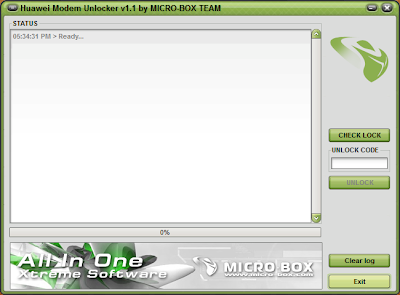
4) Now open the Unlocker application, you will get a window like this


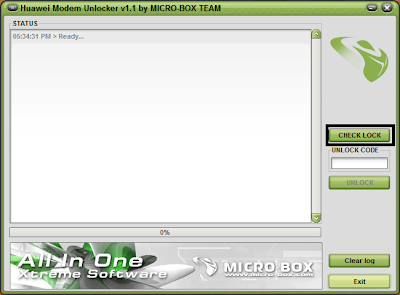
5) After you connect your modem click CHECK LOCK button to check the lock status of your modem. See the screenshot


6) Now see your modem is already unlocked or not.  It will say LOCKED if your modem is locked.


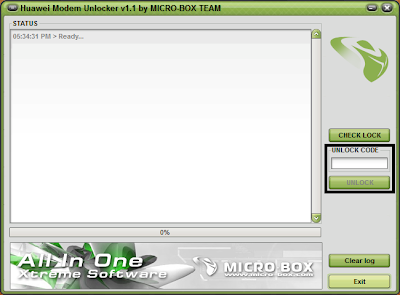
7) If your modem is locked then put the unlock code in the box below the CHECK LOCK button and press UNLOCK.


8) Thats it. You are done. Your modem is now unlocked and can be usable with any sim card of your choice.


Post your tested reports


visit link download
Read more »

Huawei H1611 unlock done by sohidulbokul

Huawei H1611 unlock done by sohidulbokul


SigmaKey v.2.21.04 build 02
426871453 Sigma dongle 2.21, Initializing...OK
Pack 1: Activated
Pack 2: Activated
Pack 3: Not activated
--------- 2016-12-22 13:28:10 ---------
SigmaKey 2.21.04b2 Qcom: Direct unlock
DBAdapter Reserved Interface (COM26), Provider: Huawei Incorporated, Driver ver.: 2.0.6.714, Date: 12/27/2015, USBVID_12D1&PID_1035&REV_????&MI_04
Removing firmware protection...OK
Firmware: MPSS.DPM.2.0.2.c1.14-00063-M8936FAAAANUZM-2.64302.1.65448.1
Date: Aug 31 2016 01:39:55, Aug 01 2016 00:00:00, FAAAANUZ
Software IMEI: 8613xxxxxxxx
Bluetooth address: ADDAB752CBF4
Software IMEI2: 861384030495010
Modem Version: MSM8939C07B130_AMSS Aug 31 201601:39:55; HW Version: HL1H1611M
System Version: H1611C07B130_SYSTEM; Baseband Processor: MSM8939
Phone model: HUAWEI H1611; Provider: att / us
Security area saved to "C:UsersGHADMANDocumentsSigmaKeysecurity backup8xxxxxxxxxxx0_8xxxxxxxxxxxxx010_HUAWEI H1611.skb"
Unlocking phone...Done
Restarting phone....PLEASE RESTART PHONE MANUALLY!
Done


visit link download
Read more »

Huawei G7010 Unlock 100 Done

Huawei G7010 Unlock 100 Done


Model Selected : G7010
Using ComPort : MTK USB Port (COM27)
Device detected ok.
IMEI : 353915048990651
CHIPID : AEB10930B9699A12FDBE76566A552339
Read backup ok, lets go..
Backup saved to : C:NCK DongleMain ackuphuawei_mtk353915048990651efs1.bin
Sserver connection ok
Data received ok
Data received, prodceed unlock.
Successfuly unlocked
Please restart phone


DOWNLOAD DRIVER


visit link download
Read more »

Saturday, December 30, 2017

How to Unlock Bootloader on Sony Xperia Devices Official Method

How to Unlock Bootloader on Sony Xperia Devices Official Method


September 20, 2012 in Android General Rooting How Tos, Android How Tos, Featured, How Tos, Sony Xperia Arc How Tos, Sony Xperia Arc S How Tos
Sony-xperia-bootloader-unlock
In order to discourage owners from messing with their devices, companies lock devices� bootloaders most of the times.  But for more enterprising users like our readers, this is seen more as a hindrance than a failsafe to rooting and flashing custom ROMs/kernels.  Times have changed now and manufactuers are now waking up to the developer community�s contribution that has grown exponentially over the years, and are offering to unlock bootloaders safely.  One such company is Sony (previously Sony-Ericsson) and this guide below will show you how to unlock your bootloader if you own a relatively recent Xperia device.

I.  Before You Begin

1.  Unlocking your bootloader will void your warranty.  Sony is particular about this and so are we.  Make sure you realize what you are losing before you take the next step!
2.  You will be opting out of over-the-air updates when you unlock your bootloader.
3.  Back up anything you feel is important before you proceed.

II.  Can my Xperia device be Unlocked?

Sony has been adding devices to the unlockable bootloader list over time and if your handset is listed on this page under the Supported Phones section, your device�s bootloader can be unlocked!  Another way to check is:
1. Enter *#*#7378423#*#* on your phone dialer to access the service menu.
2.  Go to Service info > Configuration > Rooting Status.  Check if Bootloader unlock allowed says Yes in this section.
If you found Yes, then you are in luck and your bootloader can be unlocked!

III.  Unlocking the Bootloader

1.  Install the Android SDK.  Use our setup guide (until Step 4) to do this easily.
2.  Download the fastboot driver file from Sony.
3.  Extract the downloadinf.zip you downloaded to a folder on your desktop.  This folder will now contain a single file called android_winusb.inf; copy this file.
4.  Go to c:android-sdkextrasgoogleusb_driver and paste the copied file here.  If you are asked to overwrite an existing file of the same name, do so.
5.  Find your IMEI number and write it down somewhere accessible.  To find out your IMEI number, type in *#06# on your phone dialer.
6.  Go to Sony Mobile�s Unlocking Site.
7.  Click on the Yes, I�m sure button to begin the process.
8.  Tick both the checkboxes agreeing to Sony�s legal terms and click on the I accept button.
9.  You should now be at the Unlock request page.  Enter your name, email and your device�s IMEI number and click on Submit.
10.  Your unlock code should now be revealed.  Write/copy this down somewhere accessible.
11.  Power down your device.
12. Hold the Menu button (Xperia arc, Xperia arc S, Xperia neo, Xperia neo V, Xperia pro) or the Search button (Xperia Play) or the Volume up button (Xperia mini, Xperia mini pro, Xperia ray, Xperia active, Live with Walkman, Xperia S) and connect the device to your PC using the microUSB cable already provided.
13.  If you are asked to install drivers, point the driver installer to c:android-sdkextrasgoogleusb_driver.
14.  Open up a command prompt window and type in the following commands.  To open up a command prompt windows, hit the Windows key + R to open up the Run dialog box, type in cmd in the Open field and hit Enter.
cd C:android-sdkplatform-tools
fastboot.exe -i 0x0fce getvar version
[You should get a response back, something like 0.3, which means your phone is connected and detected properly]
fastboot.exe -i 0x0fce oem unlock 0xKEY
[Replace the KEY in 0xKEY with the unlock code you obtained from the Sony website]
Your bootloader should now be successfully unlocked!
If you need help with this procedure, please ask in the comments below or in the forum.
This is part of our Android How To�s. We have how to�s on rooting, loading ROMs, and tons of other tips and tricks for your specific device or for Android devices in general! For all of our Android How To�s, head here.
Read more at http://theunlockr.com/2012/09/20/how-to-unlock-bootloader-on-xperia-devices-official-method/#lYLZxoeAfk10JUTP.99


visit link download
Read more »

How to Root HTC Evo 4G LTE Unlock Bootloader CWM Recovery

How to Root HTC Evo 4G LTE Unlock Bootloader CWM Recovery


Today our tutorial How to Root HTC Evo 4G LTE�Unlock bootloader and install clockworkmod cwm touch recovery�on Android 4.0 ICS firmware build versions 1.22.651.1 and 2.13.651.1. HTC Evo 4G LTE was announced by Sprint in March 2012 has already created a huge customer base in United States. One of the most sold phone on Sprint network, featuring a 1 Ghz Scorpion processor with Adreno 200 GPU which makes it very comparable to Nexus S 4G. Recently the device got official Android 4.0.3 Ice Cream Sandwich ICS update from HTC. Now you can root, install clockworkmod recovery and install Android ICS based custom ROM�s. On this tutorial we are providing detail procedure to root HTC Evo 4G easily with the help of simple rooting tool. This guide has been taken from the XDA developer WIKI and all thanks to them.
Read more �

visit link download
Read more »