Showing posts with label pro. Show all posts

Thursday, January 4, 2018

How to Install TWRP 3 1 1 1 and Root Huawei Honor 8 Pro Success 100 Tested

How to Install TWRP 3 1 1 1 and Root Huawei Honor 8 Pro Success 100 Tested


How to Install TWRP 3.1.1-1 and Root Huawei Honor 8 Pro Success 100% Tested.

Root Huawei Honor 8 Pro. If you need any information about how to root Huawei Honor 8 Pro, now you are at the right place. This guide will show you how to root the Honor 8 Android phone. Also, this guide is fully tested on this video. You can directly watch it or continue reading this guide. We will present this guide very simple, and easy to understand. Even if you are a beginner on Android trick. Everyone has different reasons to root their Android device, so does the Honor 8 Pro owner.

By rooting your Huawei Honor 8 Pro, you will get some advantages, for example, you can increase your phone speed and battery life, Block Ads in Apps that contains Ads, even you can remove pre-installed crapware. as we have seen, that crapware cannot be uninstalled without root access. And much more advantages.

Now, lets this guide begin.

Prerequisite.

  1. As the main requirement to root your Huawei Honor 8, you need to unlock the bootloader. If you dont know how to do it, you can read the following guide - How to unlock the bootloader on any Huawei phone.
  2. Enable USB debugging on your phone.
  3. D0wnl0ad ADB and fastboot from Here
  4. Downl0ad PHH Superuser from Here
  5. Downl04d TWRP recovery root from this link.
    • Once TWRP successfully downloaded, now put this TWRP into a platform-tools folder.
    • Rename it to twrp.img

Install TWRP 3.1.1-1 Honor 8 Pro | Guide.

  1. Extract platform-tools-latest-windows.zip file.
  2. Go to extracted folder
  3. Then, Open platform-tools folder.
  4. Now, connect your Huawei Honor 8 Pro to the computer via USB cable.
  5. Then, from the ADB fastboot folder right click and hold the shift button, and click open command window here.
    open command in adb fastboot
    open command in adb fastboot
  6. Once command prompt windows come up, now you need to check your Huawei Honor 8 Pro successfully connected or not using the following command and press enter.
    • adb device.
  7. If your device is successfully connected to the computer, then the result will return like this.
    • list of devices attached ...
  8. Once your Huawei Honor 8 Pro successfully connected to the computer. Now, reboot your device into bootloader using this command and press enter
      • adb reboot bootloader

  9. Just wait a minute, your device will reboot into fastboot and rescue mode.
  10. Once your device in the fastboot and rescue mode, its time to flash TWRP recovery to your device. Therefore you need to type this command at prompt and then press enter button

    • fastboot flash recovery twrp.img

  11. Just wait for 2 or 3 seconds for the complete flashing process.

Boot Honor 8 Pro into Recovery.

  1. Power off your Honor 8 Pro.
  2. Now, press and hold three buttons simultaneously located at the side phone body
    • Volume UP + Volume Down + Power Button
  3. Release all button if you see a Honor logo comes up on your screen.
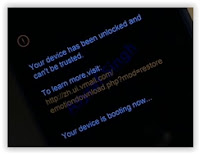
  4. Now, you will see that honor 8 Pro has been unlocked status on screen.
    Honor 8 pro recovery mode
    Honor 8 pro recovery mode
  5. And now your device will boot into TWRP recovery.
  6. Tap Wipe - Format Data - type Yes - Ok
  7. Tap Back - Reboot - Recovery - Dont install
  8. Now your device will reboot into TWRP recovery.again. To root your Honor 8 Pro read the next step below.

Root Honor 8 Pro.

  1. You need to copy Superuser-r310-beta (download link available at prerequisite) to the internal storage of Huawei Honor 8 Pro
  2. Continued from step no. 8 above. or, make sure your device in TWRP recovery mode.
  3. From TWRP main menu, tap Install.
  4. Then, tap Superuser-r310-beta.zip from internal storage.
  5. Now, Swap to confirm flash.
  6. Once Zip file successfully flashed, you just need to click on reboot.system.
  7. Now, your Huawei Honor 8 Pro will reboot into the system.


visit link download
Read more »

Saturday, December 30, 2017

IceCream Ebook Reader PRO Portable for Windows Free Download

IceCream Ebook Reader PRO Portable for Windows Free Download


IceCream Ebook Reader PRO Portable Review for Windows 7 Free Download Full Version


IceCream Ebook Reader PRO 2.23 Multilingual

SIZE: 24.25 MB

Library
Reading progress
Book search
Full screen mode
Bookmarks
Night mode

Home Page: http://icecreamapps.com/

Download Link


visit link download
Read more »

How to install Butterflies PRO Live wallpaper 1 1 mod apk for android

How to install Butterflies PRO Live wallpaper 1 1 mod apk for android


Butterflies PRO Live wallpaper.apk 1.1
Name: Butterflies PRO Live wallpaper.apk
ID: com.pansoft.butterflies
Version: 1.1
Size: 5.2 Mb


Butterflies PRO Live wallpaper Screenshots

How to get Butterflies PRO Live wallpaper patch 1.1 apk for android
How to get Butterflies PRO Live wallpaper lastet apk for android
How to mod Butterflies PRO Live wallpaper lastet apk for bluestacks

How to install Butterflies PRO Live wallpaper apk for android

- For Android 4.0 or higher:
Please to Settings, look down to Security, and select Unknown sources. Choosing this choice will enable to install apps download from the internet.
- For devices running on lower Android 4.0:
Please go to Settings - open the Applications option, and select Unknown sources, click OK on the popup alert.

Butterflies PRO Live wallpaper Description

Beautiful Live Wallpaper - Butterflies. Winter is coming. Start of butterflies in your phone and they will create you a summer, sunny mood.
���� 15 species of butterflies.
Several kinds of backgrounds.
The sky at sunset, sunny skies, cloudy sky.
Flower meadows, daisies, roses, chrysanthemums.
Only until 25 December - Christmas sales, the PRO version for only $0.99

Whats new in Butterflies PRO Live wallpaper 1.1


Butterflies PRO Live wallpaper | 10 Reviewers | | Rating: 3.2

Download Butterflies PRO Live wallpaper 1.1 APK

  • Google Play
  • DOWNLOAD


Search terms:
How to download Butterflies PRO Live wallpaper patch 1.1 apk for pc
How to use Butterflies PRO Live wallpaper unlimited apk
How to mod Butterflies PRO Live wallpaper 1.1 apk
How to get Butterflies PRO Live wallpaper mod apk


visit link download
Read more »

Friday, December 29, 2017

Hypotéka pro OSVČ Nic není nereálné

Hypotéka pro OSVČ Nic není nereálné


V uplynul�ch dnech jsem za?al ?e�it hypot�ku. To je v dne�n� dob? docela obvykl� z�le�itost, nikoliv v�ak pro lidi, kte?� jsou "na I?", jin�mi slovy OSV?.

Moje zku�enost z uplynul�ch n?kolika m?s�c?, kdy jsem si cht?l refinancovat svoji st�vaj�c� hypot�ku byla n�sleduj�c� - ano, jsme otev?en� banka a �ivnostn�k?m rozum�me. Uka�te n�m pros�m da?ov� p?izn�n�. Aha, vych�z� n�m tu, �e m�te hrub� p?�jem 20 tis�c m?s�?n?. Co�e? Da?ov� pau��l, jako�e ty n�klady neutrat�te? Pod�vejte se, pane - my sice vid�me, �e v�m m?s�?n? z?st�v� na �?t? 15ti n�sobek m?s�?n� spl�tky. Dokonce vid�me i to, �e byste tu hypot�ku mohl okam�it? splatit, ale nezlobte se na n�s, my v�m to refinancov�n� prost? nepovol�me, proto�e jste moc rizikov�.

S touhle zku�enost� s refinancov�n�m m? tak napadlo, �e bychom si mohli koupit domek v maxim�ln� cen? 8 a p?l mega :)

Hypote?n� makl�?ka m? vyslechla s kamennou tv�?�, pot� za?ala bu�it do kalkula?ek r?zn�ch bank a vy�lo j�, �e by m? p?ijala Pyramida, kter� se na p?�jmy �ivnostn�k? d�v� tak n?jak optimisticky. Pominu-li n?jak� niance �v?ru od stavebn� spo?itelny, opravdu to do�lo ke zd�rn�mu schv�len�.

N�sledn? jsem na�el d?m za cca 6 mega, la?ka se posunula o pozn�n� n�e a tak jsem se rozhodl podrobit testu trh hypote?n�ch nab�dek je�t? jednou.

U tohoto mus�m zm�nit jednu vtipnou z�le�itost. Hypote?n� bank�?ka prohl�sila, �e mus�me zkusit Raifku a Spo?ku. U Raifky jsem VIP klient, �?et m�m cca od roku 1999, pokud dob?e po?�t�m, je to 17 let. Na mnou ovl�dan�ch �?tech je hotovost n?co ke dvou mil. K?. Kdy� p?ijdu nedejbo�e na pobo?ku, m?j osobn� Premium banking bank�?, co se st?�d� ka�d� rok, proto�e tam maj� fluktuaci jak bl�zen, m? p?emlouv�, a? si d�m hypot�ku k nim. V bankovn�m sektoru pracuji u� asi 10 let, plat m�m docela vysok�, st�le mi chod� do Raifky, v�echno je tam kr�sn? vid?t.

Tak�e mil� hypote?n� poradkyn? naklusala do RB s ��dost� a odpov?? m?la u� druh� den: Nep?ipad� v �vahu, abych tam dostal hypot�ku.
Ups...
Asi tam ty svoe �?ty zru��m.

No na�t?st� m�me je�t? tu spo?ku, kter� m?la odpov?? ne dal�� den, ale za dva dny - hypot�ku mi daj�.

Tak�e moje rada pro OSV? zn� - zkuste Pyramidu, ?eskou spo?itelnu.

V ruk�vu jsem m?l je�t? Hypote?n� banku, kde maj� Hypot�ku bez dokl�d�n� p?�jm?, ale jen do 50ti procent hodnoty nemovitosti.

D?kuji za pozornost :)

visit link download
Read more »

Saturday, December 23, 2017

Huaweis Mate 10 Pro is a high end alternative to Samsung Apple devices

Huaweis Mate 10 Pro is a high end alternative to Samsung Apple devices


Chinese smartphone giant Huawei has not been shy about its ambition to dethrone Samsung and Apple to become the top smartphone vendor in the world. While Huawei is still seen as a bit of an outsider, particularly in the U.S., its new flagship Mate 10 Series smartphones could change the game for the company.

Huawei provided me with a review unit of the Mate 10 Pro smartphone for a week. Launched in October and made available earlier this month, the phone is the higher-end version of the flagship Mate 10.

There were certain features I really liked, and that particularly goes for the long battery life, which means you probably wont have to carry a power bank on you to get through the day.

There were also a few things I didnt like, but more on that later. Lets start with what you should know about the Mate 10 Pro, if youre shopping for a new smartphone this Christmas.

The dual glass and metal body

The Mate 10 Pro looks and feels like a solid high-end phone with a dual glass body around an aluminum frame that feels great in your hands. But the back and front glass makes the phone very prone to fingerprint smudges � so having a microfiber cleaning cloth is handy.

It is also a pretty big phone, featuring a 6-inch screen. One-handed navigation was an issue for me because I have small hands. But Huawei provides a way around it: If you swipe your finger over the navigation bar at the bottom, it activates a mini screen that allows comfortable, one-handed browsing. To go back to full screen mode, youll need to tap on the gray area again.

If the feature isnt automatically activated, it can be accessed under settings and inside the smart assistance tab.


Because of the thin bezel on the phone, Huawei followed the Samsung route and built the fingerprint scanner on the back, just below where the camera sits. That took some getting used to since my current phone has a fingerprint scanner on its front.

There were two major negatives about the phones body.

First, the Mate 10 Pro does not have a headphone jack. Instead, Huawei provides a pair of USB Type-C earphones. That means you cant use the headphones when youre charging the device.

Secondly, the device does not have a MicroSD slot for additional storage like Samsungs Galaxy Note 8 does. I tend to have a lot of photos, videos and screenshots that take up considerable space. So having expandable storage is a must-have for me. That said, the Mate 10 Pro provides 128 gigabytes of storage space in the standard model, which should be sufficient for most users.

The device is also water and dust resistant � a feature that is now expected in most high-end phones � meaning it can probably survive a bit of rough handling outdoors. Ingress protection (IP) is a way to measure how durable a phone is against water and dust, and the Mate 10 Pro has a IP67 rating. Thats the same rating as the newer iPhones, while Samsungs Galaxy Note 8 has slightly better water resistance.

A huge display for video streaming

The phone has a resolution of 2,160 by 1,080 pixels on a 6-inch screen and comes with an organic light-emitting diode (OLED) panel. That means sharper, more vibrant colors, and the screens 18:9 aspect ratio makes watching videos very enjoyable. When you stream something on Netflix, as you can see below, the video covers up most of the phone.

The device is also HDR10 compliant, which means in the future itll be possible to stream high dynamic range (HDR) content from Netflix or YouTube. Currently, Netflix only supports a handful of devices for that level of streaming.

However, the screen resolution is a step below what Huaweis competitors like Samsung or Google are pushing out. Even the Mate 10 has a higher resolution of 2560 by 1440 pixels but it uses an LCD panel with a traditional 16:9 aspect ratio. That said, the differences in image quality are very subtle.

An artificially intelligent chip and a smart camera

The Mate 10 Series comes with the Kirin 970 chipset, an internally developed artificial intelligence processor from Huawei. The company claims the processors machine learning algorithm adapts and understands behavior patterns, and that it is able to stop the devices from losing their speed and responsiveness over time. Given the time constraints of a review model, CNBC was unable to test out those claims.

Apple also put an AI chip into its latest iPhone X handset.

That said, the Huawei AI works mostly in the background to optimize the phone for the users, but one area where you can test its functionality is with the camera.

Both smartphones have a dual camera from Leica, which have sensors and image stabilization that pick up sharp, focused images with a wider breadth of colors.

One aspect I really liked was the Mate 10 Pros ability to recognize scenes and objects when shooting in the auto mode. That feature is powered by the AI running inside the device and it can recognize up to 13 different subjects including food, selfies, sunsets and landscapes.

For example, if you point the camera in front of a potted plant, a tiny leaf icon would appear on the bottom right hand corner of the screen, indicating the phone understands its looking at something leafy. The camera settings adjust automatically to take the best shot possible for whatevers in the frame.

The auto mode is great when you need to capture a moment where there isnt enough time to adjust the camera settings to compensate for either too much, or too little, light. But I prefer having more control over my photos, so theres a manual option that lets me manually adjust the camera settings.

Another thing I liked about this phone is its ability to take good photos in low-light conditions, due to the larger aperture lenses and dual sensors that can capture more light.

Heres an example of Singapore at night:

Long battery life and fast charging

One area where Huawei is well ahead of the competition is in battery life. The Mate 10 Pro comes with a massive 4000 mAh battery that lasted me more than a day on a single charge.

I mostly use my phone to check emails, browse social media, respond to messages on various apps, stream a few YouTube videos and play a few games. On my personal phone, those games consume a fair amount of battery when I play for more than 30 minutes at a stretch. When Im not using a phone, it is usually in sleep mode and my screen brightness is always set at 30 percent.

After the first day of using the Mate 10 Pro, and doing all of the usual stuff, the battery was still at about 40 percent. That was without using any of the power saving features the phone comes with.

That said, the Mate 10 Pro, despite having a glass body, doesnt have wireless charging like its other high-end rivals. Instead, it uses Huaweis Supercharge technology to power up the phone pretty quickly.

I charged the review unit from a 20 percent battery to full power in a little over an hour. But the fast charging doesnt work if youre using a USB port on your computer to charge the device.

The latest Android OS and the EMUI 8.0 skin

The Mate 10 Pro has the latest version of the Android operating software. Like most smartphone makers, Huawei put its own proprietary Android skin, called EMUI 8.0, on top and that comes with a few useful features.

For example, you can take screenshots by tapping the screen once with your knuckle. To split the screen, tap and drag your knuckle once horizontally across.

Another useful feature is the phones ability to instantly translate text into several dozen languages using Microsoft Translator. For example, by holding the phone over a block of English text, I could instantly translate it into Japanese. That works even when theres no internet connection so getting work done on the road is a lot easier.


I also liked the Mate 10 Pros Easy Projection feature, with which you can turn the device into a full desktop. Samsung already offers that functionality with its DeX Station, but that requires the separate purchase of a dock.

For the Mate 10 Pro, all you need is a USB Type-C HDMI cable, or an adapter, and an external monitor. Once you plug in the cable, your phone turns into a trackpad while the monitor displays all of your apps in a special desktop mode. You can add peripherals like a keypad and a mouse. Meanwhile, the phone runs normally in the background and switching between either mode is easy.

When I tried to test the feature, I had to go hunt around for the right cable and it took a few tries to get it right. But the end result was worth it.

The downside, however, is that you cant charge your phone at the same time, whereas, according to Samsung, the DeX also acts as a phone charger.

Should you buy it?

The Mate 10 Pro is one of Huaweis top offerings � it is a solid, high-end phone with several very useful features.

In terms of price, the Mate 10 Pro is considerably cheaper than its competitors, at least in a market like Singapore. Huawei has yet to announce a starting price or availability for the U.S. market. (For its part, the company says it does not comment on "future roadmaps.")

The device costs 1,098 Singapore dollars (about $811) for the 128GB storage model, while a special designer unit, with 256GB memory, is priced at S$2,298 ($1,699).

For comparison, Samsungs Galaxy Note 8, unlocked, costs S$1,398, but it comes only with 64GB of internal memory. Youll need to add a microSD to increase your storage space.

Meanwhile, the unlocked iPhone 8 Plus costs S$1,308 for the 64GB model and S$1,548 for the 256GB. The starting price for the iPhone X is S$1,648.

But if youre in the market for a smartphone that has all the best features available, and price is not an issue, then devices from Samsung, Google and Apple are probably still better options.

The Mate 10 Pros lack of wireless charging and the absence of a headphone jack might put some people off � especially, if youre used to having those features in your current smartphones.

That said, if youre looking for a high-end phone that gives a great battery life, has a very good camera, is integrated with AI and has interesting features like the Projection Mode, you could give this phone a try.

visit link download
Read more »

Friday, December 22, 2017

How To Hack WiFi using Android With Wpa Wps Tester Pro Apk very easy

How To Hack WiFi using Android With Wpa Wps Tester Pro Apk very easy


THIS IS ONLY FOR EDUCATIONAL PURPOSE. We WILL NOT BE RESPONSIBLE FOR ANY MISSUS OF THIS METHOD OR ANY OF SOFTWARE. 


1.CAN WE Know WIFI USING ANDROID
yes, with the help of some unique toos , a wifi connection can be accessed without knowing passwoed.
2.WHY THE WIFI�S ARE PROTECTED WITH A PASSWORD?
generally to avoid unauthorized access to any user, you can also find  many open wifi in metro cities
3.WHAT KIND OF SECURITY A WIFI CONNECTION HAVE OR SHOULD HAVE?
mostly wifi connection is protected with WEP WPA WPA2 WPS ETC or any other is also possible.
WEP: WEP is Wired Equivalent Privacy that can be accessed easily when configured appropriately. This method of encryption can be accessed within few minutes.
WPA: WPA is Wi-Fi Protected Access that provides a strong security. Even then, there is possibility to access if the Wi-Fi password if short. However, wireless networks can be accessed easily using various tools.
WPA2: WPA2 is Wi-Fi Protected Access 2  also eventually provides high security. You can access this method of Wi-Fi encryption at the time of packet generation from Wi-Fi access points.
WPS: WPS stands for Wi-Fi Protected Setup and it is a wireless networking standard that tries to make connections between a router and wireless devices faster and easier than any other security type. It works only for wireless networks that have WPA Personal or WPA2 Personal security not for any other. WPS doesn�t provide support for wireless networks using the deprecatedWEP security,lets get started
4.WHICH WIFI IS EASY TO access?
wps is best for accessing� very easy to hack � can be accessed with wps wpa tester premium/wps connect/androDumpper
wep is also good to access � little tough to access� can be accessed with backtack/kali linux/wifite/Wifiphis
wpa/wpa2 can also be accessed � very tough to access � wpa security is very hard to crack .. this can also be cracked with kali linux
5.HOW CAN I access A WIFI.. THAT IS SHOWING IN MY MOBILE AND IN RANGE?
Accessing with the android phones is little tough in-spite of that you can easliy access a WPS CONNECTION with the said tool that i am listing below.. but remember only that wifi connection that are having wps can be accessed not wep and wpa.
1.you must have a rooted phone� if your phone is not rooted then google it or youtube it and root first
2. you will also need wpa wps tester premium app .. download
3.you will also need busy box premium app .. download
Everything is now done you can also visit this site for further help
6.WHAT IS THE GUARANTEE THAT IF I INSTALL THESE ALL THINGS WIFI WILL BE ACCESSED?
There is No guarantee, it may also possible that your android may soft brick while root.. busy box can also give you some minor issues so totally risky game and try at your own risk
however if everything goes well u will be able to access a wps connection easily
7.WHAT IS THE GUARANTEE THAT A WPS WIFI WILL BE ACCESSED?
generally 5-6/10 ratio comes if you try to access 10 wps connections you can easily access 5-6 wps password.sometimes it didn�t work then just restart your android device and again try.
8.WHAT TO DO IF WPS WPA PREMIUM IS NOT ABLE TO ACCESS A WPS WIFI?
wps wpa premium is working well for me .. i am using MI REDIMI NOTE 3 mobile and i have personally tested it .. it works well for me .. hopefully it would also work for you� if you are really unable to access a wps then you need to change your location and again try different wps connection i already told you guys if you try 10 wps connection then mostly 5-6 wps wifi are easily accessable.
9.WHAT IS THE TECHNIQUE OF accessing A WPS WITH WPS WPA TESTER PREMIUM?
there is no special technique, it is simple as it shows in your mobile phones it also shows me the same thing the difference is only that only wps are accessable with this app not wep wpa.. so that it might possible it is not working for you but if you change your location and again try with different wps wifi .. it may work for you also.

THANKS FOR VISITING. SHARE THIS WITH YOUR FRIENDS AND HACK WIFIS


Join Our Facebook Group to also attain addition help and updates. If You Feel any Doubt Related to Our Post & any Queries Related to Android, We will Try Our Best to Solve Your Problem Join Us On Facebook group [click here]


Also Read-  We have also done many tutorials on other trick. To download Whatsapp Plus[click here]. If you want to learn wifi hacking using AndroDumpper then click here. To learn how to hack wifi password using Wpa Wps Tester apk[click here].If you want to learn how to hack facebook and Gmail account then click here. If you want to crash your friends whatsapp using Whatsapp Bomber App then click here. To make a mobile ringtone with your own name online[click here]. To learn how to make whatsapp video call[click here].To fool your friends on Whatsapp using image preview changer[click here]. To learn how to transform your android device into ios9 using ios 9 launcher[click here]. To download candy crush MegaMod then click here. To download SuperPhoto full app[click here]. To download World Cricket Championship MegaMod with Unlimited money, Unlimited Wickets and Everything unlocked[click here].

KEEP VISITING DUDES
ENJOY


THIS IS ONLY FOR EDUCATIONAL PURPOSE. We WILL NOT BE RESPONSIBLE FOR ANY MISSUS OF THIS METHOD OR ANY OF SOFTWARE.


1.CAN WE Know WIFI USING ANDROID

yes, with the help of some unique toos , a wifi connection can be accessed without knowing passwoed.

2.WHY THE WIFI�S ARE PROTECTED WITH A PASSWORD?

generally to avoid unauthorized access to any user, you can also find  many open wifi in metro cities

3.WHAT KIND OF SECURITY A WIFI CONNECTION HAVE OR SHOULD HAVE?

mostly wifi connection is protected with WEP WPA WPA2 WPS ETC or any other is also possible.

WEP: WEP is Wired Equivalent Privacy that can be accessed easily when configured appropriately. This method of encryption can be accessed within few minutes.

WPA: WPA is Wi-Fi Protected Access that provides a strong security. Even then, there is possibility to access if the Wi-Fi password if short. However, wireless networks can be accessed easily using various tools.

WPA2: WPA2 is Wi-Fi Protected Access 2  also eventually provides high security. You can access this method of Wi-Fi encryption at the time of packet generation from Wi-Fi access points.

WPS: WPS stands for Wi-Fi Protected Setup and it is a wireless networking standard that tries to make connections between a router and wireless devices faster and easier than any other security type. It works only for wireless networks that have WPA Personal or WPA2 Personal security not for any other. WPS doesn�t provide support for wireless networks using the deprecatedWEP security,lets get started

4.WHICH WIFI IS EASY TO access?

wps is best for accessing� very easy to hack � can be accessed with wps wpa tester premium/wps connect/androDumpper

wep is also good to access � little tough to access� can be accessed with backtack/kali linux/wifite/Wifiphis

wpa/wpa2 can also be accessed � very tough to access � wpa security is very hard to crack .. this can also be cracked with kali linux

5.HOW CAN I access A WIFI.. THAT IS SHOWING IN MY MOBILE AND IN RANGE?

Accessing with the android phones is little tough in-spite of that you can easliy access a WPS CONNECTION with the said tool that i am listing below.. but remember only that wifi connection that are having wps can be accessed not wep and wpa.

1.you must have a rooted phone� if your phone is not rooted then google it or youtube it and root first

2. you will also need wpa wps tester premium app .. download

3.you will also need busy box premium app .. download

Everything is now done you can also visit this site for further help

6.WHAT IS THE GUARANTEE THAT IF I INSTALL THESE ALL THINGS WIFI WILL BE ACCESSED?

There is No guarantee, it may also possible that your android may soft brick while root.. busy box can also give you some minor issues so totally risky game and try at your own risk

however if everything goes well u will be able to access a wps connection easily

7.WHAT IS THE GUARANTEE THAT A WPS WIFI WILL BE ACCESSED?

generally 5-6/10 ratio comes if you try to access 10 wps connections you can easily access 5-6 wps password.sometimes it didn�t work then just restart your android device and again try.

8.WHAT TO DO IF WPS WPA PREMIUM IS NOT ABLE TO ACCESS A WPS WIFI?

wps wpa premium is working well for me .. i am using MI REDIMI NOTE 3 mobile and i have personally tested it .. it works well for me .. hopefully it would also work for you� if you are really unable to access a wps then you need to change your location and again try different wps connection i already told you guys if you try 10 wps connection then mostly 5-6 wps wifi are easily accessable.

9.WHAT IS THE TECHNIQUE OF accessing A WPS WITH WPS WPA TESTER PREMIUM?

there is no special technique, it is simple as it shows in your mobile phones it also shows me the same thing the difference is only that only wps are accessable with this app not wep wpa.. so that it might possible it is not working for you but if you change your location and again try with different wps wifi .. it may work for you also.


THANKS FOR VISITING. SHARE THIS WITH YOUR FRIENDS AND HACK WIFIS


Join Our Facebook Group to also attain addition help and updates. If You Feel any Doubt Related to Our Post & any Queries Related to Android, We will Try Our Best to Solve Your Problem Join Us On Facebook group [click here]


Also Read-  We have also done many tutorials on other trick. To download Whatsapp Plus[click here]. If you want to learn wifi hacking using AndroDumpper then click here. To learn how to hack wifi password using Wpa Wps Tester apk[click here].If you want to learn how to hack facebook and Gmail account then click here. If you want to crash your friends whatsapp using Whatsapp Bomber App then click here. To make a mobile ringtone with your own name online[click here]. To learn how to make whatsapp video call[click here].To fool your friends on Whatsapp using image preview changer[click here]. To learn how to transform your android device into ios9 using ios 9 launcher[click here]. To download candy crush MegaMod then click here. To download SuperPhoto full app[click here]. To download World Cricket Championship MegaMod with Unlimited money, Unlimited Wickets and Everything unlocked[click here].

KEEP VISITING DUDES
link download
Read more »

How to Mod the Memory Stick Pro Duo

How to Mod the Memory Stick Pro Duo


This modification will allow you to use the Memory Stick PRO Duo on card readers that require an adapter.
It's very helpful if you lost your adapter or don't have one. It may also work if you push the memory stick in until it reads it. But if not, try the following.


Read more �

visit link download
Read more »

Tuesday, December 19, 2017

How to mod 三姑六婆 Pro 親戚稱呼計� �機 patch 0 20 apk for pc

How to mod 三姑六婆 Pro 親戚稱呼計� �機 patch 0 20 apk for pc


???? Pro - ???????.apk 0.20
Name: ???? Pro - ???????.apk
ID: com.blogspot.relativescalc.pro
Version: 0.20
Size: 0.6 Mb


???? Pro - ??????? Screen Preview

How to get ???? Pro - ??????? 0.20 apk for android
How to mod ???? Pro - ??????? 0.20 unlimited apk for android
How to download ???? Pro - ??????? 0.20 apk for pc

How to install ???? Pro - ??????? apk for android

- For Android 4.0 or higher:
Please to Settings, look down to Security, and select Unknown sources. Choosing this choice will enable to install apps download from the internet.
- For devices running on lower Android 4.0:
Please go to Settings - open the Applications option, and select Unknown sources, click OK on the popup alert.

???? Pro - ??????? Description

???????/???????
?BB???????????????
????App????
????????????????????????????
???????????????????
?App?????????????????????
?????????????????
???????????????????????
Pro????
1. ??????
2. ??????????=??????????????????????
3. ??????(?700KB)
* ????????????Lite????
?????
?????10??????????????????????????????
???????????????????????????
??????????????=?????????????
???????????????????????????????????????
??????????=??????????????????????
???????????????????????????
???
???? [???????????????????]?????????
?????? [?]????????????????
?????? [=]?????????????
?????? [AC]??????????
???? [CE]?????/????????
????? [?]???????????
???????https://relativescalc.com/translate
Facebook???https://www.facebook.com/relativescalc
An app for Chinese relatives title look-up, for those who understand Chinese.

Whats new in ???? Pro - ??????? 0.20

??: 0.20
- ??7?????
- ???Icon
??: 0.18
- ??Android 5.0????
??: 0.17
- ??????????????????????
- ??????????????????????
???? Pro - ??????? | 57 Reviewers | | Rating: 4.9

Download ???? Pro - ??????? patch 0.20 APK

  • Google Play
  • DOWNLOAD


Search terms:
How to mod ???? Pro - ??????? patch 0.20 apk for bluestacks
How to use ???? Pro - ??????? unlimited apk
How to mod ???? Pro - ??????? 0.20 apk
How to get ???? Pro - ??????? unlimited apk


visit link download
Read more »

How to Root the Sony Ericsson Xperia X10 Mini Pro

How to Root the Sony Ericsson Xperia X10 Mini Pro


Sony-Ericsson-XPERIA-X10-mini-pro_1
The X10 mini pro has been around for a long time now but with a bustling developer community, the device has managed to stay fresh and even has ICS custom ROMs now.  This guide below will show you how to get there by taking the first step � root the Xperia X10 mini pro.  Read on then if you want to do this.

I.  Before You Begin

1.  This procedure will work on Xperia X10 mini pro running v2.1.1.A.0.6.  If you have a device running some other version, leave a comment in the Comments section below and we�ll tell you if this works on that version or another procedure that could work for your firmware.
2.  This procedure is designed to work on the Windows (preferably Windows 7) operating system.
3.  Back up everything you feel is important before you start with the procedure.

Necessary Downloads

1.  SuperOneClick.rar [File attached to the first post of this thread]

IV.  Rooting the Xperia X10 Mini Pro

1.  Extract SuperOneClick.rar to a folder on your desktop.
2.  Enable USB Debugging on your device.  To do this, go to Menu > Settings > Applications > Developer Options and tick the USB Debugging checkbox.
3.  Connect your device to your PC and if there are any drivers being installed at this point, let Windows 7 do so.
4.  From the folder, you extracted above, run SuperOneClick.exe.
5.  Click on Root.
Your Xperia X10 Mini Pro should be rooted once the application confirms that your device is rooted!

IV.  Unrooting the Xperia X10 Mini Pro

1.  Follow the same steps as in Section IV until Step 4.
2.  Click on Unroot.

V.  Flashing Custom Recovery (Optional)

If you would like to flash a custom recovery image in order to flash custom ROMs, head to the next procedure to learn how to do that.
If this procedure helped you please thank/donate to the original developers here.
If you need help with this procedure, please ask in the comments below or in the forum.
This is part of our Android How To�s. We have how to�s on rooting, loading ROMs, and tons of other tips and tricks for your specific device or for Android devices in general! For all of our Android How To�s, head here.


visit link download
Read more »

Monday, December 18, 2017

How To Root Infinix Hot 4 Pro X556

How To Root Infinix Hot 4 Pro X556


I believe many have been googling on how to root their Infinix Hot 4 pro and if you are one of them this article will help you to do that within minutes, �note that this Twrp for Infinix Hot 4 Pro is different from that of Hot 4..
Read more �

visit link download
Read more »

HP Pro Slate 10 EE Specifications

HP Pro Slate 10 EE Specifications


HP Pro Slate 10 EE


ABOUT DEVICE

Release dateJanuary 2015
Dimensions (mm)280.00 x 182.00 x 14.40
Weight (g)855.00
Removable batteryNo
ColoursGrey
SAR valueNA
Display
Screen size (inches)10.10
Resolution800x1280 pixels
Hardware
Processor1.33GHz  quad-core
Processor makeIntel Atom Z3735G
RAM1GB
Internal storage16GB
Expandable storageYes
Expandable storage typemicroSD
Expandable storage up to (GB)32
Camera
Rear camera2-megapixel
FlashNo
Front camera1.2-megapixel
Software
Operating SystemAndroid 4.4
Java supportYes
Browser supports FlashNo
Connectivity
Wi-FiYes
Wi-Fi standards supported802.11 a/ b/ g/ n/ ac
GPSNo
BluetoothYes
NFCNo
InfraredNo
DLNANo
Wi-Fi DirectNo
MHL OutNo
HDMINo
HeadphonesNo
FMNo
USBNo
Charging via Micro-USBYes
Proprietary charging connectorNo
Proprietary data connectorNo
3GNo
Voice CallingNo
StylusNo
Sensors
Compass/ MagnetometerNo
Proximity sensorYes
AccelerometerYes
Ambient light sensorYes
GyroscopeYes
BarometerNo
Temperature sensorNo


visit link download
Read more »

How to install Cocktails and drinks PRO LWP patch 1 2 apk for bluestacks

How to install Cocktails and drinks PRO LWP patch 1 2 apk for bluestacks


Cocktails and drinks PRO LWP.apk 1.2
Name: Cocktails and drinks PRO LWP.apk
ID: com.pansoft.cocktailpro
Version: 1.2
Size: 2.1 Mb


Cocktails and drinks PRO LWP Screenshots

How to mod Cocktails and drinks PRO LWP 1.2 mod apk for android
How to install Cocktails and drinks PRO LWP 1.2 unlimited apk for bluestacks
How to install Cocktails and drinks PRO LWP lastet apk for pc

How to setup Cocktails and drinks PRO LWP apk for android

- For Android 4.0 or higher:
Please to Settings, look down to Security, and select Unknown sources. Choosing this choice will enable to install apps download from the internet.
- For devices running on lower Android 4.0:
Please go to Settings - open the Applications option, and select Unknown sources, click OK on the popup alert.

Cocktails and drinks PRO LWP Details

Summer, refreshing live wallpaper - a cocktail. Beautiful live wallpaper HD quality representing a variety of drinks and cocktails. The PRO version is:
����� Fizzy water with ice.
����� Mojito cocktail. (lime, mint leaves, white rum, soda, ice)
����� Colibri cocktail. (basil, pear, pear syrup, lemon juice, birch juice, physalis, ice)
Daiquiri coctail.(white rum, lemon juice, sugar cane syrup, ice)
Blue lagoon cocktail. (vodka, lemon juice, lemonade, liquor "Blue Curacao", slice of lemon ,ice)
Shark tooth cocktail. (white rum, lemon juice, lime juice, sugar syrup, grenadine syrup, club Soda)
Watermelon Mojito cocktail. (lime, lemon, watermelon, mint leaves, white rum, soda, ice)
Bellini cocktail. (peach juice, champagne, ice)
You can also control the amount of ingredients, their speed and size.
And also set the movement of fruit and ice. Will they sink or simply to behave more realistically, to sink, and then emerge, as it happens in real drinks.
Use the gyroscope for a more realistic behavior of fruit, ice and bubbles
Enjoy!
Only until December 25, price reduced to $0.99

Whats new in Cocktails and drinks PRO LWP 1.2

Added new cocktail Bellini. (peach juice, champagne, ice)
Added new cocktail Watermelon Mojito cocktail. (lime, lemon, watermelon, mint leaves, white rum, soda, ice)
Optimized application size
Cocktails and drinks PRO LWP | 30 Reviewers | | Rating: 4.5

Download Cocktails and drinks PRO LWP lastet APK

  • Google Play
  • DOWNLOAD


Search terms:
How to install Cocktails and drinks PRO LWP lastet apk for laptop
How to use Cocktails and drinks PRO LWP unlimited apk
How to mod Cocktails and drinks PRO LWP 1.2 apk
How to get Cocktails and drinks PRO LWP mod apk


visit link download
Read more »

Saturday, December 16, 2017

HOW TO ROOT SAMSUNG GALAXY TAB PRO 12 2 SM T905

HOW TO ROOT SAMSUNG GALAXY TAB PRO 12 2 SM T905


Follow this step by step guide to get root access on Samsung Galaxy Tab Pro 12.2 using the CF-Root method. CF-Root by the ChainfireXDA is one of the easiest and safe way to gain root access on many galaxy devices, however rooting your tablet using this method will trip the KNOX, however there is nothing to be worried about this issue, as it can be fixed after you�ve got rooted. If you�ve decided to to root your Tab Pro 12.2 then follow the instructions below to get started.
Root at your own risk!!

Guidelines and Requirements:

  • This rooting guide is only for Samsung Galaxy Tab Pro 12.2 SM-T905.
  • CF-Root package: CF-Auto-Root-v2lte-v2ltexx-smt905.zip
  • Odin3 v3.07 flashing tool is required. It is included in the CF-root zip package.
  • Install Kies or USB drivers on your PC.
  • Go to Phone Settings > Developers Options and Enable USB debugging. If by default Developers Options is not enabled, go to About device and tap the Build Number for about 7 to 8 times.
  • Before you start the rooting process, it is highly recommended to check your phone battery status.
  • Do not skip any step and carefully read and follow the instructions to safely root your device.
Samsung Galaxy Tab Pro 12.2 in Black

How to Root Samsung Galaxy Tab Pro 12.2 (SM-T905) running Android 4.4.2 KitKat

Step 1: First of extract the CF-Auto-Root zip file on your desktop:
Rooting-Files-Galaxy-Tab-Pro-12-2
Step 2: Run Odin3 v3.07 exe file.
Step 3: Power off your tablet and reboot it into Download Mode  by pressing and holding theVolume Down+Home+Power buttons simultaneously for a while. When you see a warning message on the screen, Press the Volume Up.
Step 4: Connect your Galaxy Tab Pro 12.2  to PC via the USB cable.
Step 5: Make sure that Odin3 detects your device. The ID:COM port will turn blue and you should also notice the Added!! in the message section which confirms that it has made a successful connection.
Step 6: Click on the PDA button and select the tar.md5 rooted kernel file from the folder:
odin-galaxy-tab-pro-12-2-sm-t905
Step 7: Wait for Odin to check and verify the file then Click on the START button to flash the CF-Root which will install the SuperSU app and stock recovery.
Step 8: Within a few seconds, the flashing process will be completed and Odin will give you a green labeled PASS!! message and during this your tablet will automatically reboots.
You can now disconnect your phone from PC. Open the app drawer and check that SuperSU has been installed.
Congratulations!! You�ve now successfully rooted Samsung Galaxy Tab Pro 12.2 running on Android 4.4.2 KitKat
What if you get this error �Unfortunately SuperSU has stopped�? Here is how to fix it
  • Download and install the latest SuperSU APK
  • Open SuperSU app (Update the binary if prompted) and allow it to disable Knox
  • Reboot the device.
Do not forget to share your experience in the comment section below and leave your feedback. If you�ve found this guide useful? Share it with your friends. If you�re having issues with rooting your tablet, feel free to ask for further support. Last but not the least, Thanks toChainfireXDA for making this tutorial possible. For more Android Rooting Tutorials keep visiting.


visit link download
Read more »