Showing posts with label cpu. Show all posts
Showing posts with label cpu. Show all posts
Thursday, January 4, 2018
HTC Desire 326G dual sim SPD CPU
HTC Desire 326G dual sim SPD CPU
HTC Desire 326G dual sim [SPD CPU]

2PNTIMG_V01A_DUG_K443_SENSE53_INDIA_1.51.720.1
Key: lO5JHWT4kh5bO3qTueOA6R2NA_yVTcB5ekiNmPbmG5A
Flash tool Here
2PNTIMG_V01A_DUG_K443_SENSE53_INDIA_1.51.720.1
Key: lO5JHWT4kh5bO3qTueOA6R2NA_yVTcB5ekiNmPbmG5A
Flash tool Here

Sunday, December 31, 2017
How to play Gameloft games without lag and Disable CPU throtling without root on Lenovo K3 Note k50t5 k50a40
How to play Gameloft games without lag and Disable CPU throtling without root on Lenovo K3 Note k50t5 k50a40

The Lenovo K3 Note is an amazing budget phablet that does pretty much everything right. But users complained that games lagged after playing for about 5-10 minutes in K3 Note whereas the Meizu M2 Note which has the same CPU as the Lenovo K3 Note handled all the games very smoothly.
So what do you think what might be the problem here?
Lenovo has enabled CPU throttling to prevent CPU temperatures from going above 50 degree celsius.
So, whenever you play game on K3 Note after a few minutes the CPU temp hits 50 degree celsius mark which activates the thermal throttling mechanism. When thermal throttling gets activated you can see a sudden frame drop while playing games like Asphalt 8 and Modern Combat 5.
Here I will show you how to disable thermal throttling in Lenovo K3 Note without rooting your phone!
PROCEDURE TO DISABLE CPU THROTTLING ON LENOVO K3 NOTE :
1. Flash TWRP recovery using SP Flash Tools by following tutorial from this link here : http://yoyovirus.blogspot.in/2015/08/how-to-flash-custom-recovery-to-lenovo.html
2. After you successfully flash TWRP recovery, boot your phone into the recovery mode by presssing Volume UP + Volume DOWN + Power buttons together at the same time.
3. Once you boot into TWRP recovery you will see some options like shown in the below image.
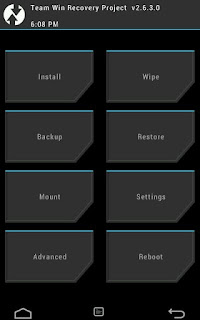
4. Now select Mount Option and then put a cross on "System" option to Mount the System as hown in below image.
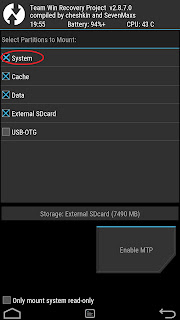
5. Then press the back button to return to the main screen of TWRP
recovery.
6. Now, select Advanced option and then select File Manager option.
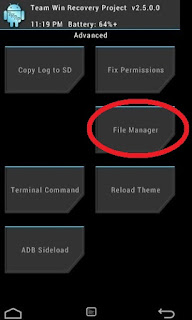
7. Here browse goto root path and then browse to System/etc/.tp path.
8. Here you will see three files . Select the file with name "thermal.conf".
9. Rename this file by giving any extension like "thermal.conf.xxx".
10. Congrats you have successfully disabled CPU throttling from Lenovo K3 Note.
11. Go back to main screen of your TWRP recovery and power off your phone by selecting Restart and then Turn off option.
12.Now Flash "Stock Recovery" using SP Flash Tools in similar way you flashe TWRP recovery.
13.Power On your phone and now you can play all the Gameloft games like Asphalt 8 and Modern Combat 5 and other HD games with no lags and frame drops.
Note :
1.Only for Vibe UI ROW Stock ROM.
2.You can also disable CPU throttling on a rooted K3 Note by renaming "thermal.conf" to "thermal.conf.xxx" file in "System/etc/.tp" directory using ES File Explorer. But by rooting your k3 Note you can not update your phone via OTA updates.So, I suggest the above procedure.
1.Only for Vibe UI ROW Stock ROM.
2.You can also disable CPU throttling on a rooted K3 Note by renaming "thermal.conf" to "thermal.conf.xxx" file in "System/etc/.tp" directory using ES File Explorer. But by rooting your k3 Note you can not update your phone via OTA updates.So, I suggest the above procedure.
FB GROUP : LENOVO K3 NOTE OFFICIAL GROUP [INDIA]
https://www.facebook.com/groups/Lenovo.K3.Note.Official.Group.India/
Thursday, December 21, 2017
Imax HM 104 Spd 6531 Cpu Flash File 100 Tested
Imax HM 104 Spd 6531 Cpu Flash File 100 Tested
contacts number
+8801725000669
Download Here
somadhantelecom@yahoo.com
How to Flash
Step 1: Download and extract the stock firmware on your computer.
Step 2: After extracting you will find the SP Flash Tool, Driver and instruction manual.
Step 3: Install the USB Drivers (skip if drivers are already installed).
Step 4: Open the SP Flash Tool and load the Scatter File from the firmware folder.
Step 5: Connect your Smartphone to the computer using the USB Driver.
Step 6: Click on Upgrade / Download Button in the SP Flash Tool to Begin the Flashing.
Step 7: Green Ring will appear at the end of successful Flash.
Important Notes:[*] Take a Backup of your personal data before flashing or installing the firmware on your smartphone. As this helps you to recover the personal data whenever any thing wrong happens.
+8801725000669
somadhantelecom@yahoo.com
How to Flash
Step 1: Download and extract the stock firmware on your computer.
Step 2: After extracting you will find the SP Flash Tool, Driver and instruction manual.
Step 3: Install the USB Drivers (skip if drivers are already installed).
Step 4: Open the SP Flash Tool and load the Scatter File from the firmware folder.
Step 5: Connect your Smartphone to the computer using the USB Driver.
Step 6: Click on Upgrade / Download Button in the SP Flash Tool to Begin the Flashing.
Step 7: Green Ring will appear at the end of successful Flash.
Important Notes:[*] Take a Backup of your personal data before flashing or installing the firmware on your smartphone. As this helps you to recover the personal data whenever any thing wrong happens.
how To unlock a10 a13 cpu tablet
how To unlock a10 a13 cpu tablet
WIPE ROM 100% Solution
1) Phone Must be on
2) Driver Install
3)On Wipe Rom and press enter then open task manaser and u close task manaser and press enter
DOWNLODE
1) Phone Must be on
2) Driver Install
3)On Wipe Rom and press enter then open task manaser and u close task manaser and press enter
DOWNLODE
Thursday, November 30, 2017
Huawei announces Honor 2 with a quad core CPU and 2GB RAM
Huawei announces Honor 2 with a quad core CPU and 2GB RAM
Huawei has announced the Android-based Honor 2, which comes with some major hardware improvements over its predecessor.

The Huawei Honor 2 will be releasing in China later this week for 1,888 yuan ($302).
Source
The Huawei Honor 2 will be releasing in China later this week for 1,888 yuan ($302).
Source
Subscribe to:
Posts (Atom)