Showing posts with label unbrick. Show all posts
Showing posts with label unbrick. Show all posts
Tuesday, December 26, 2017
How to Unbrick and flash Stock ROM on Lenovo K3 Note k50 t5
How to Unbrick and flash Stock ROM on Lenovo K3 Note k50 t5
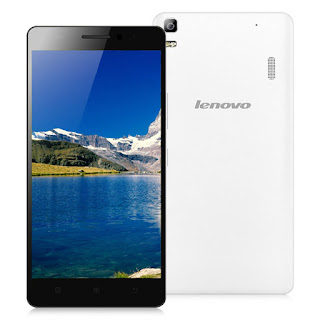
If you are familiar with the rooting process, you probably know that rooting and changing the ROM in android phone remove the manufacturer warranty. But if the phone already have official ROM the warranty will never void.
The official ROM for Lenovo K3 Note smartphone is now available. At below I have given the procedure to install the stock ROM on your phone. By installing this ROM you will back to official ROM.
PRE-REQUISITES:
1. First ensure the battery of your phone is above 75%, so then it will never get switched OFF during the middle of the process.
2. Next take full backup of your phone.
3. Also backup the important data like SMS messages, Whatsapp messages, Contacts etc., as this would be formatted during the process.
4. Next install the drivers for your phone using Lenovo K3 Note drivers.
Disclaimer : Follow the given below procedure at your own risk. I would not be held responsible for any damage that occurs to your phone, in case you do not follow the procedure properly.
REQUIREMENTS:
1. Official stock ROM (K50a40_S112_150610_ROW.7z) Lollipop 5.0 Indian version : download link Click Here to Download
2. Lenovo K3 Note Drivers : Click Here to Download (Check the files section on fb group)
3. SP Flash Tool download link: Click Here to Download (Check the files section on fb group)
4. A Windows PC
5. A Lenovo K3 Note (obviously)
Install Driver :
Install the driver then restart your PC, then connect your phone to PC via USB cable and wait till Windows configures it. Make sure the USB Debugging is enabled in this process. Once the configuration has completed, again restart your PC.
If you are using Windows 8 or Windows 8.1 then you may face problem to install the driver so follow these steps to install an unsigned driver.
For Windows 8:
1. Win + I -> Change the computer settings -> General -> Special boot options -> Restart Now.2. When you turn off the tap Diagnostics -> Advanced Settings -> Boot Options -> Restart.
3. A menu appears, select it in the �Disable the mandatory driver signing checks� � for this you have to press F7.
For Windows 8.1:
1. Win + I -> Change the computer settings -> Update and Restore -> Restore -> Restart Now.2. When you turn off the tap Diagnostics -> Advanced Settings -> Boot Options -> Restart.
3. A menu appears, select it in the �Disable the mandatory driver signing checks� � for this you have to press F7.
PROCEDURE TO INSTALL STOCK ROM ON LENOVO K3 NOTE SMARTPHONE:
1. Next extract the Stock Rom folder
2. Extract and open the SP Flash Tools and run "flash_tool.exe" as administrator.
3. In SP Flash Tools, just click the �scatter loading� it will ask you the location of the scatter loading file for your phone.
4. In the extracted folder of the stock ROM, go to the folder named �K50a40_S112_150610_ROW� and in there go to target_bin folder select the file �MT6752_Android_scatter.txt�(it is our scatter loading file).
5. In the menu �Option� tab, go to �Download�, and put a �tick� in the �DA DL All with Checksum�.

6. Next Switch off your phone .
7. Make sure Download only option is selected in SP Flash Tool as shown in the image below. Now hit the Green Download button.

8. Connect your phone now to PC via USB. The Flash tool will start the flashing process, you can see the progress at the bottom of the flash tool.
9. Don�t disturb the process until it get finished, otherwise it will brick your phone.
10. Once the process is finished, a green check box will appear in SP Flash Tool, which implies the installation of stock firmware on your device is successful.
11. Now, disconnect your phone from USB Cable and Power On your phone.
12. Njoy! You have successfully installed the stock ROM or Official ROM on Lenovo K3 Note.
FB Group : Lenovo K3 Note Official Group [India]
https://www.facebook.com/groups/Lenovo.K3.Note.Official.Group.India/
Saturday, December 23, 2017
How To Unlock UK TMobile Orange Bluetooth MAC Address First Unbrick
How To Unlock UK TMobile Orange Bluetooth MAC Address First Unbrick
have iphone from UK vodafone clean, can I unlock icloud with this service?
Model: iPhone 6s 64GB Space Gray MM-TD A1688
IMEI: 3554190763xxxxx
SN: DNTQPGGxxxxx
Find My iPhone: ON
iCloud Status: Clean
3554190763xxxxx "Serial Number: DNTQPGGxxxxx Initial Activation Policy ID: 399 MEID: Activation Policy Description: UK Reseller Flex Policy IMEI: 355419076334799 Applied Activation Policy ID: 270 Part Description: iPhone 6s Applied Activation Policy Description: UK Vodafone. Product Version: 9.3.5 Next Tether Policy ID: 10 Last Restore Date: Next Tether Activation Policy Description: Unlock. Bluetooth MAC Address: First Unbrick Date:
Phone is not from vodafone it is from THE CARPHONE WAREHOUSE LIMITED UK
Model: IPHONE 6S NB30 64GB GRAY
IMEI Number: 3554190763xxxx
Serial Number: DNTQPGGxxxxx
FMI Status: CLEAN
Warranty Status: Apple Limited Warranty
Coverage End Date: 01/04/17
Estimated Purchase Date: 01/05/16
Registered Purchase Date: 01/05/16
Product Sold by: THE CARPHONE WAREHOUSE LIMITED
Initial Carrier: UK Carphone Flex activation policy
Purchased In: GB - United Kingdom
 I have another clean UK iphone for icloud unlock, but I need to know first did phone is sim locked to orange uk and if yes can I sim unlock?
here is gsx ordered on your server job 98828
355695078031323 "Activation Policy Details Serial Number: F17R58Q4GRY6 Initial Activation Policy ID: 399 MEID: Activation Policy Description: UK Reseller Flex Policy IMEI: 355695078031323 Applied Activation Policy ID: 302 Part Description: iPhone 6s Applied Activation Policy Description: UK TMobile Orange. Product Version: 10.2 Next Tether Policy ID: 302 Last Restore Date: Next Tether Activation Policy Description: UK TMobile Orange. Bluetooth MAC Address: First Unbrick Date: 07/07/16 Last Unbrick Date: Unbricked: UnlockedYes I know I already unlock one icloud UK in your server but my ask was did phone have simlock according GSX and if yes what provider to use for sim unlock
Br and happy new year: false Unlock Date: Close
Unlock Site
Wednesday, December 20, 2017
How To Unbrick Samsung Note 2 N7100 Back To Stock
How To Unbrick Samsung Note 2 N7100 Back To Stock

Preparations :
Install Samsung USB Driver From Here
Download Latest Kitkat Firmware of region from Here Sign Up Required For Download
Download Odin From Here
Installation :
1 : Extract Firmware .zip
2 : Run Odin3_v3.10.7.exe

3 : Now Put Your Phone into Downloading Mode
*Turn Off Your Phone
*Press Volume Down + Home Button + Power Button
*Press Volume Up Key To Continue
4 : Connect Your Phone with Computer via USB Cable
5 : Click on PDA Option And Select Extracted Firmware File
6 : Click On Start Button
7 : Wait util Finished
8 : Your Phone Restarts Automatically
9 : DOne
Tuesday, December 19, 2017
How to UNBRICK XOLO Q800
How to UNBRICK XOLO Q800
HAVE YOU BRICKED YOUR XOLO Q800 ..ahh Dont Worry we are here to help u
so here is the method of unbricking of your Xolo Q800 and bring it back
first of all we need so some stuff to un brick it
below are the links what we need to un brick
Xolo Q800
Downloads
VCOM DRIVERS
LATEST SP FLASH TOOL
XOLO Q800 SP TOOL FILES
TWRP IMAGE
STOCK ROM UNROOTED
STOCK RECOVERY MOBILE UNCLE TOOL FOR FLASHING RECOVERY IMAGES
STOCK ROM UNROOTED
STOCK RECOVERY MOBILE UNCLE TOOL FOR FLASHING RECOVERY IMAGES
Now procedure for Unbricking
1.Download all stuff from above links and place in a Folder

2.First unrar VCOM drivers and install the driver till it comes dat it installed successfully
3.Then unrar sp flash tools and xolo rar file
4.Open sp flash tools(Flash_tool.exe)
5.Go in file tab and click on open scatter file
6.Now browse to the xolo rar file which u unrared and select MT6589_scatter txt file
7.all things inside the xolo rar file will load up
8.Now click on Firmware-->upgrade and it will search for the device
9.Now switch off ur phone and connect it with pc through usb cable
10.The tool automatically detects ur phone and starts d procedure
11.First a red line will come den after few seconds blue lines will load up den yellow and etc
12.When a green circle will come saying upgrade finished,just close that and d tool too.
13.Remove usb cable and switch on ur phone it will come as fly IQ446
14 After that follow d procedure and setup ur phone
15.Note that this of flyIQ446 and it works for Q800 also(i did it).So if u want ur stock rom of Q800 or other mobile models if u have ur phone stock rom.zip to be flashed back using TWRP(see in attachments) or CWM, den download Q800 stock rom(see in attachments)
16.To gain back guarantee flash the stock recovery.img(see in attachments) thru mobile uncle tools(see in attachments)
17 Now u can enjoy ur stock rom for warranty purposes!!!!
18.Enjoy and if any doubts ask me!!!!!
3.Then unrar sp flash tools and xolo rar file
4.Open sp flash tools(Flash_tool.exe)
5.Go in file tab and click on open scatter file
6.Now browse to the xolo rar file which u unrared and select MT6589_scatter txt file
7.all things inside the xolo rar file will load up
8.Now click on Firmware-->upgrade and it will search for the device
9.Now switch off ur phone and connect it with pc through usb cable
10.The tool automatically detects ur phone and starts d procedure
11.First a red line will come den after few seconds blue lines will load up den yellow and etc
12.When a green circle will come saying upgrade finished,just close that and d tool too.
13.Remove usb cable and switch on ur phone it will come as fly IQ446
14 After that follow d procedure and setup ur phone
15.Note that this of flyIQ446 and it works for Q800 also(i did it).So if u want ur stock rom of Q800 or other mobile models if u have ur phone stock rom.zip to be flashed back using TWRP(see in attachments) or CWM, den download Q800 stock rom(see in attachments)
16.To gain back guarantee flash the stock recovery.img(see in attachments) thru mobile uncle tools(see in attachments)
17 Now u can enjoy ur stock rom for warranty purposes!!!!
18.Enjoy and if any doubts ask me!!!!!
If it Helped like our facebook page and Share it so that we can help more
Friday, December 15, 2017
Huawei Y5II CUN U29 Unbrick Firmware Flashing Guide
Huawei Y5II CUN U29 Unbrick Firmware Flashing Guide
All Firmware Link are You-tube Description Bellow Link
Thursday, December 7, 2017
How To Unbrick LG Optimus G – fix bootloop security issues
How To Unbrick LG Optimus G – fix bootloop security issues
First of all reinstall kdz on your phone :
From here
http://appsandtips.blogspot.com/2014/08/how-to-upgrade-lg-optimus-g-to-kitkat.html
Download the manual adb wipe batch file
http://www.mediafire.com/?ru7erfxsz7p7s3p
http://www.mediafire.com/?ru7erfxsz7p7s3p
1) If the phone is stuck at the booting up LG/Telco logo, you will need to manually wipe the data partition.
2) Force the phone off by holding the power button for appx 15secs.
3) Put the phone into recovery mode by holding the volume up and home button concurrently, then press the power button. Let go of all the buttons after you see the LG logo on screen for the 2nd time and the screen goes blank thereafter (backlight may still be on). The phone will kind of reboot and then enters recovery mode. Repeat the process if you did not get it the first time.
4) With the phone in Recovery Mode, connect it to the computer, wait for the drivers to load (if doing it for the first time), unzip the wipe batch file downloaded earlier from step (4), double click on wipe.bat to execute the wipe command.
5) Your phone will auto reboot when wiped and (hopefully) boot as per normal.
Wednesday, December 6, 2017
HOW TO UNBRICK INFINIX HOT NOTE X551
HOW TO UNBRICK INFINIX HOT NOTE X551

Most people brick their infinix hot note while trying to update it. Follow the procedures below an unbrick your device.
Download Android ADB drivers here or here
Download SP Flash tool here
Download the Scatter file an CWM Recovery of INFINIX HOT NOTE X551 from here
Download SP Flash tool here
Download the Scatter file an CWM Recovery of INFINIX HOT NOTE X551 from here
Download INFINIX HOT NOTE X551 ROM from here.
Extract an install the Adb drivers on your PC.
Extract the infinix hot note X551 files.
Extract the infinix hot note X551 files.
Launch Flash_tool from the extracted files.

Click on Scatter Loading on SP Flash tool then select the scatter file of INFINIX HOT NOTE X551 you downloaded.


Tick only Recovery from the list then click on Location after EMMC_USER of Recovery Line as shown below. Select the CWM Recovery file you downloaded.
Tick only Recovery from the list then click on Location after EMMC_USER of Recovery Line as shown below. Select the CWM Recovery file you downloaded.


Now click Download on SP Flash Tool.

Turn off the device and connect it to the PC holding down vol + button. (This is just to make the PC detect the device easy and start the flashing process.)
The process will take about 30 seconds to complete. When you see the successful sign, unplug your device from the PC.
Copy the extracted files of the Rom to your sdcard > clockworkmod > backup. (Create these folders if they are not available.)
Insert the sdcard into the device and boot into recovery mode.
Select backup and restore option.
Select restore
Browse through the folders and select the backup file you copied in the memory card.
Wait for the Process to complete then select reboot system now.
First booting after this process might take a while. Be patient ............. ;)
Subscribe to:
Posts (Atom)