Showing posts with label tecno. Show all posts
Showing posts with label tecno. Show all posts
Tuesday, January 2, 2018
How To Root Tecno C9
How To Root Tecno C9

Recently Tecno launched Camon C9, a beastly lovely device to add to its C device family and many Android lovers went for it. To many, it is a complete device but to those who cant do without root inorder to install custom recovery and also tweak as desired, it is not yet a complete Android.
Kingroot one click rooting app has been a very helpfull rooting app for most MTK phones to gain root access but ever since Android 6.0 came to play, rooting has not been easy on the new OS and hopefully, Kingroot team will do something about this.
While the waiting, there is another effective and reliable method to root most Android running on 6.0 and this article, i will be showing us how to Install CWM recovery on Tecno C9 and also root Tecno Camon C9 afterwards. Do follow below procedures step by step.
REQUIREMENTS:
? PC
? Working USB Cable
? SuperUser.zip - Download here
? Your Camon C9 bootloader must be unlocked. See detailed tutorial on how to unlock Tecno C9 bootloader
? CWM Recovery for Tecno C9. Download here
Granted you have met the requirements, lets begin...
How To Root Tecno Camon C9
After you must have unlocked your Tecno C9 bootloader which is very important and have also
downloaded the required files from above, do the following:
1. Copy SuperUser.zip and place it in the root of your SD card, (Dont put it in any folder)
2. Extract and copy CWM recovery.img into the
same folder containing fastboot.exe and adb.exe
3. Without putting off your phone, connect your phone to your PC via USB cable and boot it into fast boot as shown in the bootloader unlocking guide.
4. Once your device is in fastboot mode, flash the CWM recovery.img to your phone by typing the below command code in red and press "ENTER" from your PC keyboard to flash/ install CWM recovery to your device.
CODE: flash recovery recovery.img
5. After that, reboot the phone by typing the below command code and press "ENTER".
CODE: fastboot reboot
6. After rebooting your phone, switch it off and boot to recovery mode by pressing and holding Volume Up + Power Button for few seconds to boot into CWM recovery mode.
7. Now in CWM recovery mode, use the volume keys to navigate and the power button to enter..
? Navigate to "Install Zip"
? Select "Choose From SdCard"
? Locate SuperUser.zip, select it and then select "YES" to install.
8. Now, after installing SuperUser.zip, simply go back to CWM main menu and reboot.
9. If the Cwm recovery offers to fix some errors, select "NO".
Thats it, you have succesfully rooted your Tecno Camon C9. To verify root, download root checker.apk to verify.
Your feedback and comments will be appreciated. Do share this articles with your friends...

Sunday, December 10, 2017
How to root your Tecno W3 mobile phone Simple and easy steps
How to root your Tecno W3 mobile phone Simple and easy steps

If You follow the steps giving in this post Rooting your Tecno W3 will be a very easy and simple thing to do. The Tecno W3 run one of the latest OS Android 6.0 Marshmallow, Rooting the Android 6.0 marshmallow is not an easy thing to do because of google google latest security upgrades, all thanks to hovatek though for making this posible.
Materials required For Rooting Tecno W3
� PC with internet connection
� USB Cable
� SP Flash Tool - Download it Here
� SuperSU v2.66.zip - Download it Here
� TWRP for Tecno W3 - Download it Here
How to Root tecno W3
1. First of all Save or copy the SuperSU.zip that you just downloaded to your phones SD card internal storage
2. Next Now switch off the Mobile phone
3. Next flash the TWRP recovery image to the phone using this SP Flash tool guide
4. Next step Now boot your Mobile phone into TWRP Recovery Mode By holding the Volume up button and Power button simultaneously for 5 seconds.
5. If you get a prompt asking you to swipe to allow TWRP modify the system partition then go proceed and swipe. To swipe, place your finger on the green circle then slide it to the right side
6. In TWRP recovery, tap Install
7. Navigate to the location of the SuperSU.zip and select it
8. Swipe to confirm flashing of SuperSU.zip and wait till flashing is done
9. Restart your mobile phone normally
You can confirm Root access by installing and running Root Checker.
That�s all on how to root Tecno W3, I hope it works for you. we love comment a lot so do not forget to tell us The method you use to root your W3 phone.
Thursday, December 7, 2017
How To Root Tecno W3
How To Root Tecno W3
This is a tutorial on how to Root Tecno W3.
What Is Rooting?
Rooting can be said to be Android jailbreaking. Its simply a means of unlocking the operating system of a device so you can install unapproved apps, delete unwanted bloatware, update the OS, replace the firmware, overclock (or underclock) the processor, writing or changing IMEI, installing fonts, customizing anything and so on.
Tecno W3 another Tecno device runing Android 6.0 (Marshmallow).
This simply means that rooting this device could sound difficult but its simply easy to execute if you carefully follow the few steps given bellow.
How To Root Tecno W3
|
STEPS �
STEP 1: Download and install Miracle Box Drivers v1.0 to your PC.STEP 2: Download UPDATE-SuperSU-v2.76-20160630161323.zip.
STEP 3: Copy SuperSU.zip to both the device internal storage and SD card (external storage).
STEP 4: Insert the SD card to the Device.
STEP 5: ?
Download TWRP for Tecno W3 [romshillzz].
Download TWRP For Tecno W3-H806A1-M-161230V103 [romshillzz].
Download TWRP for Tecno W3-H806A1-M-170204V109 [romshillzz].
Download TWRP for Tecno W3-H806A1-M-170222V112 [romshillzz].
Download TWRP for Tecno W3 [romshillzz].
Download TWRP For Tecno W3-H806A1-M-161230V103 [romshillzz].
Download TWRP for Tecno W3-H806A1-M-170204V109 [romshillzz].
Download TWRP for Tecno W3-H806A1-M-170222V112 [romshillzz].
STEP 6: Power of Device.
STEP 7: Flash the TWRP recovery.img to the device using SP Flash tool.
Flashing the TWRP recovery.img using SP Flash tool.

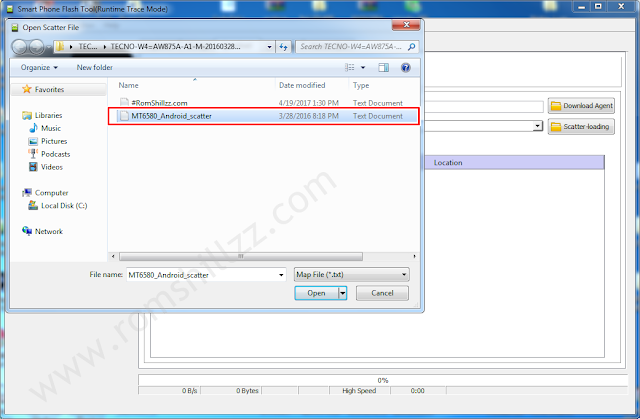
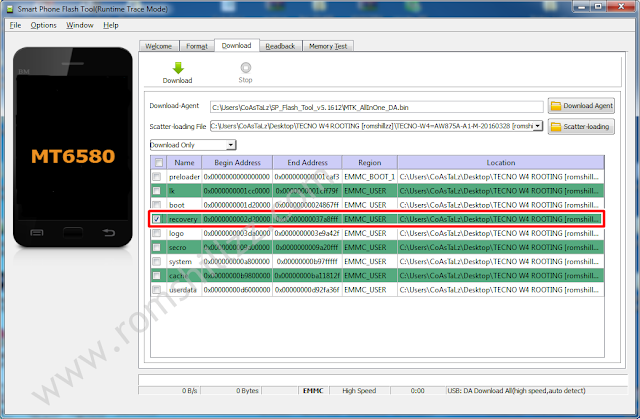

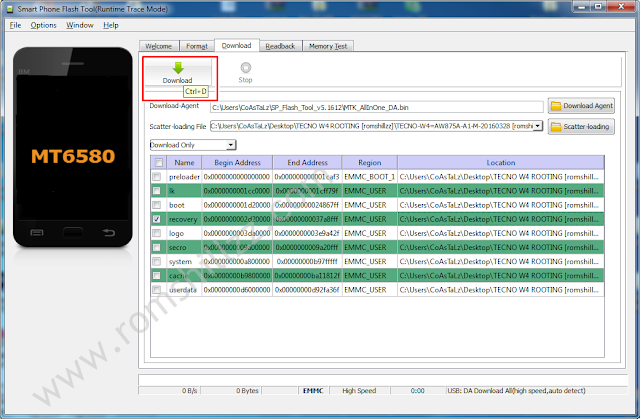

STEP 7: Boot the device into recovery mode by pressing and holding Volume up button + Power button.
STEP 8: In TWRP, if you will get a prompt asking you to swipe to allow modification then swipe.
STEP 9: In TWRP recovery, tap Install.
STEP 10: Navigate to the location of the SuperSU.zip and select it.
STEP 11: Swipe to confirm flash and patiently wait until the flashing process is complete.
STEP 12: After the flashing process is completed, Reeboot System.
STEP 8: In TWRP, if you will get a prompt asking you to swipe to allow modification then swipe.
STEP 9: In TWRP recovery, tap Install.
STEP 10: Navigate to the location of the SuperSU.zip and select it.
STEP 11: Swipe to confirm flash and patiently wait until the flashing process is complete.
STEP 12: After the flashing process is completed, Reeboot System.
Now you have successfully rooted your Infinix X557 (Infinix Hot 4)!
Confirm Root: Download and install Root Checker from Google Play Store or from here
Follow the Screenshots or read the tutorials above


|
Please Leave a comment after using this Tutorials
Report if you cannot do this.
Tuesday, December 5, 2017
How To Root Tecno Camon C9
How To Root Tecno Camon C9
This is a tutorial on how to Root Tecno Camon C9.
What Is Rooting?
Rooting can be said to be Android jailbreaking. Its simply a means of unlocking the operating system of a device so you can install unapproved apps, delete unwanted bloatware, update the OS, replace the firmware, overclock (or underclock) the processor, writing or changing IMEI, installing fonts, customizing anything and so on.
Tecno Camon C9 is another Tecno device running Android 6.0 (Marshmallow).
This simply means that rooting this device could sound difficult but its simply easy to execute if you carefully follow the few steps given bellow.
STEP #1. You need to unlock the bootloader.
STEP 2: Enable OEM Unlocking under Settings > Developer options.
STEP 3: Setup ADB and Fastboot on the PC.
STEP 4: Connect the device to your PC via USB cord (while Powered On).
STEP 5: Launch ADB.
STEP 6: In ADB, run the following command (press Enter after the imputing the command).
How To Root Tecno W4
|
STEP #1. You need to unlock the bootloader.
How To Unlock Tecno Camon C9 or C9s Bootloader
STEP 1: Enable USB Debugging on the device.STEP 2: Enable OEM Unlocking under Settings > Developer options.
STEP 3: Setup ADB and Fastboot on the PC.
STEP 4: Connect the device to your PC via USB cord (while Powered On).
STEP 5: Launch ADB.
STEP 6: In ADB, run the following command (press Enter after the imputing the command).
adb devices
STEP 7: ADB should detect the device. If ADB detects other devices but not the Tecno C9 or C9 Pro, then it must be an ADB clash, see https://forum.hovatek.com/thread-10111.html
STEP 8: Once the device is detected, boot it into Fastboot by running the following command (press Enter after the imputing the command).
STEP 8: Once the device is detected, boot it into Fastboot by running the following command (press Enter after the imputing the command).
adb reboot -bootloader
STEP 9: The Device wounld now enter Fastboot (black screen with only fastboot written at the top or bottom).
STEP 10: In Fastboot, run the following command (press Enter after imputing the command).
fastboot oem unlock
STEP 11: Now you would get a prompt on the device asking you to confirm Bootloader unlock, press the volume up button for Yes.
STEP 12: You would now get a success message.
STEP 13: Reboot the device by running the command below (press Enter after imputing the command).
fastboot reboot
Follow the Screenshots or read the tutorials above

Now you have succeeded in unlocking your tecno camon C9 or C9s bootloader so get ready for STEP #2.
STEP #2
STEP 1: Download TWRP for Tecno Camon C9 [romshillzz].
STEP 2: Setup ADB and Fastboot on the PC using the guide at https://forum.hovatek.com/thread-588.html
STEP 3: Extract and copy the TWRP recovery.img into the same folder of the fastboot.exe and adb.exe.

STEP #2
STEP 1: Download TWRP for Tecno Camon C9 [romshillzz].
STEP 2: Setup ADB and Fastboot on the PC using the guide at https://forum.hovatek.com/thread-588.html
STEP 3: Extract and copy the TWRP recovery.img into the same folder of the fastboot.exe and adb.exe.
Follow the Screenshot or read the tutorials above
STEP 4: Download SuperSU 2.66.zip.
STEP 5: Copy SuperSU.zip to both the device internal storage and SD card (external storage).
STEP 6: Connect the device to your PC via USB cord (while Powered On) and boot device into fastboot as instructed in STEP #1.
STEP 7: When the device enters Fastboot, Flash the TWRP recovery.img to the device by typing the command below then pressing Enter after imputing.
STEP 8: The device would automatically boot into TWRP recovery mode.
STEP 6: Connect the device to your PC via USB cord (while Powered On) and boot device into fastboot as instructed in STEP #1.
STEP 7: When the device enters Fastboot, Flash the TWRP recovery.img to the device by typing the command below then pressing Enter after imputing.
fastboot boot recovery.img
STEP 8: The device would automatically boot into TWRP recovery mode.
STEP 9: In TWRP, if you will get a prompt asking you to swipe t
visit link download
Read more »
Monday, December 4, 2017
How To Root Tecno W2
How To Root Tecno W2
This is a tutorial on how to Root Tecno W2.
What Is Rooting?
Rooting can be said to be Android jailbreaking. Its simply a means of unlocking the operating system of a device so you can install unapproved apps, delete unwanted bloatware, update the OS, replace the firmware, overclock (or underclock) the processor, writing or changing IMEI, installing fonts, customizing anything and so on.
Tecno W2 another Tecno device runing Android 6.0 (Marshmallow).
This simply means that rooting this device could sound difficult but its simply easy to execute if you carefully follow the few steps given bellow.
How To Root Tecno W2
|
STEPS �
STEP 1: Download and install Miracle Box Drivers v1.0 to your PC.STEP 2: Download SuperSU.zip >> SR3-SuperSU-v2.79-SR3-20170114223742.zip or SR1-SuperSU-v2.78-SR1-20160915123031.zip.
STEP 3: Backup your device firmware in scatter format using miracle Box.
STEP 4: Copy SuperSU.zip to both the device internal storage and SD card (external storage).
STEP 5: Create a new folder name RomShillzz on your PC.
STEP 6: Copy preloader.bin from your Miracle Box backup into the RomShillzz folder you created.
STEP 7: Download Philz for Tecno W2 [romshillzz].
STEP 8: Extract the Philz file and copy the Philz recovery.bin and scatter file to the RomShillzz folder, making peloader.bin, scatter file and recovery.bin in the folder.
STEP 9: Flash the preloader.bin and recovery.bin using Miracle Box.
STEP 4: Copy SuperSU.zip to both the device internal storage and SD card (external storage).
STEP 5: Create a new folder name RomShillzz on your PC.
STEP 6: Copy preloader.bin from your Miracle Box backup into the RomShillzz folder you created.
STEP 7: Download Philz for Tecno W2 [romshillzz].
STEP 8: Extract the Philz file and copy the Philz recovery.bin and scatter file to the RomShillzz folder, making peloader.bin, scatter file and recovery.bin in the folder.
STEP 9: Flash the preloader.bin and recovery.bin using Miracle Box.
Flashing the Preloader.bin and Recovery.bin using Miracle Box.


STEP 10: Boot the device into recovery mode by pressing and holding Volume up button + Power button.
STEP 11: In the Philz recovery,use the Volume buttons to navigate and Power button to select.
STEP 12: Select Install zip.
STEP 13: Choose zip from /storage/.
STEP 14: Navigate to the location of the SuperSU.zip and select it.
STEP 15: Click Yes Install SR1-SuperSU-v2.78-SR1-20160915123031.zip.
STEP 14: If you are prompted to fix root, select No.
STEP 15: Patiently wait until the flashing process is complete.
STEP 16: After the flashing process is completed, Reeboot Device normally.
STEP 11: In the Philz recovery,use the Volume buttons to navigate and Power button to select.
STEP 12: Select Install zip.
STEP 13: Choose zip from /storage/.
STEP 14: Navigate to the location of the SuperSU.zip and select it.
STEP 15: Click Yes Install SR1-SuperSU-v2.78-SR1-20160915123031.zip.
STEP 14: If you are prompted to fix root, select No.
STEP 15: Patiently wait until the flashing process is complete.
STEP 16: After the flashing process is completed, Reeboot Device normally.
Now you have successfully rooted your Tecno W2!
Confirm Root: Download and install Root Checker from Google Play Store or from here
|
Please Leave a comment after using this Tutorials
Report if you cannot do this.
Friday, December 1, 2017
How to root tecno camon c9 without stress
How to root tecno camon c9 without stress
Do you agree with me that Android ain't no fun without tweaking and tweaking ain't possible without rooting? Camon C9 have been proving very stubborn when it comes to rooting probably because its running Android 6.0 marshmallow, but all thanks to Hovatek for making
Subscribe to:
Comments (Atom)