Monday, January 1, 2018
How to make a Windows 8 startup message
How to make a Windows 8 startup message
Here�s how to create a custom screen message before entering Windows.
VB Scripting
Go to the folder below
C:Users[Username]AppDataRoamingMicrosoftWindowsStart MenuProgramsStartup
Create a text file with extension .vbs e.g. msg.vbs

Once created, open the file in notepad and write the following command: msg �your message�
| msg �Hi, don�t forget all the things that you need to submit�� |
Restart your computer to see the results�
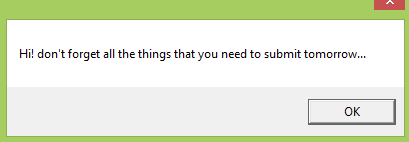
That�s it!
Using Windows Registry
Open your registry editor by pressing Win+R and type �regedit�.

Once the editor is open, go to the following folder
HKEY_LOCAL_MACHINESOFTWAREMicrosoftWindowsCurrentVersionPoliciesSystem
or
HKEY_LOCAL_MACHINESOFTWAREMicrosoftWindows NTCurrentVersionWinlogon
Find the two registry names or create them by using New �> String Value Menu at any vacant space of the tool.
LegalNoticeCaption
This is where the Title or Caption of the message located upon entering the Welcome Screen e.g. Disclaimer Notice
LegalNoticeText
This is where your message is being inputted.
Using a tweakui tool
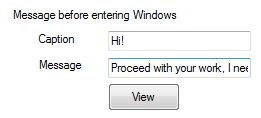
WinBubbles-lite is a small program to access windows 7 and above customizations. You�ll be able to apply the tweak easily by entering the caption and message then afterwards press Alt-A. To see the results, see your message by clicking the View Button.
Thanks for reading the article!

Saturday, December 30, 2017
How to Save Message and Missed call to Gmail account using auto forwarding Method
How to Save Message and Missed call to Gmail account using auto forwarding Method

Tuesday, December 26, 2017
How to send free Message to Mobile with Twitter Account
How to send free Message to Mobile with Twitter Account
Free sms @ Airtel, Reliance, Docomo, Videocon
1. If you dont have a twitter account please create one.
2. Open your twitter account and add your mobile number. You can add mobile number using the link https://twitter.com/settings/devices. Add number and press active phone.
3. Now verify your mobile number. For that you need to send a SMS with keyword GO to 53000. Twitter or mobile providers (other than Gulf countries) doesnt charge for this.
4. Once your mobile number is verified, you and your friend should follow each other. Now you can start sending messages. The format to send message is
@<friends twitter ID> <Your Message> to 53000
For example, you want to send message How are you !� to your friend Chand2 (Twitter id: chand2like), type
@chand2like How are you !
In your mobile and send it to
53000
Then your friend will immediately receive it as
How are you !
Note: The maximum length of message that can be send is 140. And you can send any number message a day.
Update: If any of the user register at DNT service, the sms may not receive. And you can�t send sms after 9pm and before 8am. That means you can�t send messages for 11 hours (That is from 9pm to 8am). More over in peak hour time it may experience delay.

Saturday, December 23, 2017
How to Put Message conference in Facebook account
How to Put Message conference in Facebook account


Friday, December 22, 2017
How to trace Someone text Message in your mobile phone its possible!
How to trace Someone text Message in your mobile phone its possible!

Why Cell Phone Monitoring is Used ?
Its is used to develop the technology,and private investigators for law enforcement agencies use worldwide countrys.Using this software you can able to hack your friends text messages and contacts,etc.

Fearuters You can Track :
--> call log
--> SMS (Text Message)log
--> Contacts.
--> Tasks
--> Memos.
--> Cell ID Location.
--> E-Mail Log.
--> Calender Events.
--> URL(web site)Log.
--> Photo&Videos.
Cell Phone Monitoring Review :
Download Trial Period For 7days :
Android User : http://www.mobile-spy.com/android-inst.html
Blackberry User : http://www.mobile-spy.com/blackberryspy.html
Symbian User : http://www.mobile-spy.com/symbianos9.html
Windows Mobile User : http://www.mobile-spy.com/windowsmobile6.html
Apple IPhone User : http://www.mobile-spy.com/iphone3.html
Apple IPad User : http://www.mobile-spy.com/ipad4install.html
Try IT and Get BENEFIT....
User Guide : http://www.mobile-spy.com/userguide.html